.svg)




In the previous parts, we explored how to control the .NET data types for your variables and parameters, and the benefits of doing so. One important area is arrays (lists), which we cover in this part.
By default, PowerShell assigns the type [Object[]] to all arrays:

Object is the base .NET type from which all other types derive. Essentially, this means that such an array can store values of any data type.
Typed Arrays
By default, generic arrays perform no validation, so any type of data can be added:

To ensure that PowerShell prevents unwanted data from being added, choose a data type that accurately represents your data, and then append [] to make it an array:
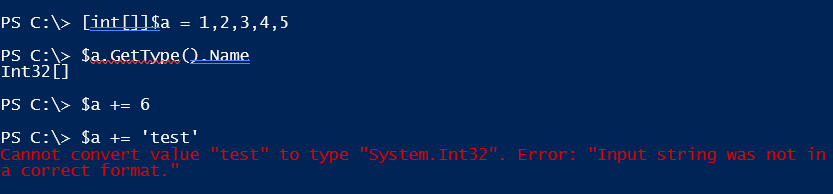
It works the same way as selecting a data type for single values, except that you append [] to the .NET type name so that multiple values of the same type can be stored:
Fixed Size
While this approach can optimize memory usage and provides validation, it does not change the fundamental nature of your array, which is always of fixed size:

This may be surprising, since we just used the operator += to add items to such an array. In reality, however, += does not truly append to the array (because it is of fixed size). Instead, it creates a new array with one additional element and copies the old array into it.
While this approach works if you only add items occasionally, it becomes inefficient when done frequently, such as inside a loop.
The following example uses a for loop to add new strings to a string array and employs a stopwatch to measure the time required:
[System.Diagnostics.Stopwatch]$stopwatch = [System.Diagnostics.Stopwatch]::StartNew()

[string[]]$myArray = @()

for($x=0; $x -lt 10000; $x++)
{
    $myArray += "Adding line $x"
}

$stopwatch.Stop()
$stopwatch.Elapsed
Even though only 10,000 elements are added to the array - which is trivial for today’s computers - it takes a surprisingly long time. The stopwatch records 9.5 seconds on Windows PowerShell (PowerShell 7 shows some improvement):

If you iterate 100,000 times instead of 10,000, it wouldn’t take just 10 times longer—it could ultimately break your script and run effectively “forever.” This happens because the fixed-size array must be copied into new arrays repeatedly, eventually exhausting system resources.
Better Array Types
By choosing array types that are not fixed in size, you can easily avoid this problem and save significant time. Because these arrays can grow dynamically, the expensive += operator is no longer needed; instead, their Add() method is used:
[System.Diagnostics.Stopwatch]$stopwatch = [System.Diagnostics.Stopwatch]::StartNew()

[System.Collections.ArrayList]$myArray = @()

for($x=0; $x -lt 10000; $x++)
{
    $null = $myArray.Add("Adding line $x")
}

$stopwatch.Stop()
$stopwatch.Elapsed
This time, the same result took just 27 milliseconds:

Arrays of type [System.Collections.ArrayList] are not fixed in size. Therefore, when you use the Add() method, no costly array copying is required:

[System.Collections.ArrayList] is not strongly typed and can store any data type. From a memory and validation perspective, this is not optimal. Additionally, its Add() method returns the position at which a new element was inserted, which is why you often need to assign the result to $null.
A superior .NET array type is [System.Collections.Generic.List[T]], which can be strongly typed. The T represents any type you choose. For example, [System.Collections.Generic.List[Object]] can store any type of value, whereas [System.Collections.Generic.List[Int32]] stores only [Int32] numbers. Moreover, its Add() method does not return a value.
Although this code takes roughly the same 27 milliseconds, it eliminates the need for a $null assignment and allows you to control the type of data stored in your array:
[System.Diagnostics.Stopwatch]$stopwatch = [System.Diagnostics.Stopwatch]::StartNew()

[System.Collections.Generic.List[string]]$myArray = @()

for($x=0; $x -lt 10000; $x++)
{
    $myArray.Add("Adding line $x")
}

$stopwatch.Stop()
$stopwatch.Elapsed
PowerShell-Native Optimization
In summary, choosing a more suitable data type for your arrays allows you to avoid the costly += operator and significantly speed up your scripts.
However, this kind of optimization is unnecessary if you do not add items one by one to your array and instead let PowerShell handle it:
[System.Diagnostics.Stopwatch]$stopwatch = [System.Diagnostics.Stopwatch]::StartNew()

$result = for ($x=0; $x -lt 10000; $x++)
{
    "Adding line $x"
}

$stopwatch.Stop()
$stopwatch.Elapsed
In this case, the loop does not assign its result to any intermediate variable. Instead, you store the final result directly into your variable. This way, the array is populated only once, and without using any advanced .NET types, you outperform all the previous examples, filling a standard [Object[]] array in just 22 milliseconds - compared to the initial 9.5 seconds.
Related links
- ScriptRunner ActionPacks will help you automate tasks
- Try out ScriptRunner here
- ScriptRunner: Book a demo with our product experts