.svg)


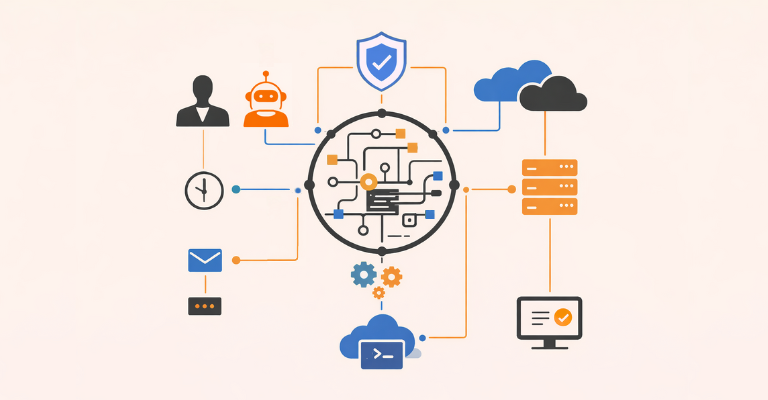

Automation is no longer about writing scripts in isolation or connecting a handful of workflows together.
In 2026 and beyond, modern enterprises need a complete automation system underlying their routine business processes. In this system, triggers, orchestration logic, and agentic workflows are centrally managed to coordinate tasks seamlessly from end to end.
This is the world ScriptRunner was designed for. We've built a platform for enterprise PowerShell automation that sits at the heart of the Microsoft ecosystem and governs everything from human-triggered actions to AI-driven agentic automations, enabling automation across the enterprise to deliver value quicker, more securely, and more accurately.
This first article in our series introduces the end-to-end system approach: how automations are triggered, how the automation engine processes them, and how they execute across the Microsoft ecosystem and beyond.
In later articles, we’ll take each phase (trigger types, the automation engine, and fully automated systems) and explore them in depth.
Why Today’s Microsoft Automation Requires a System-Level View
Many organizations still think about automation as a set of isolated scripts or workflows owned by individual teams. This is a situation which comes with inherent pitfalls, and which we’ve been trying to remediate for a long time.
The shift toward enterprise-wide digital operations and agentic automation makes this even more urgent.
Modern automation must be:
- Connected: operating across cloud, hybrid, and on-premises systems.
- Governed: controlled through consistent access controls, policies, approvals, and logging.
- Observable: with a complete audit trail and comprehensive monitoring.
Without this, risks of configuration drift, security weaknesses, and issues with regulatory compliance mean that automation workflows cannot scale or be reliably integrated with core business infrastructure, especially when autonomous AI-driven decision making is involved.
Therefore, whether you’re provisioning users accounts, reacting to incidents, managing configurations, or executing complex cross-functional workflows, everything should work within a predictable closed-loop structure:
Trigger → Automation Engine → Automated System Task → Results/Feedback Loop
This is the backbone of a stable, scalable automation strategy that generates ROI in the agentic automation era, and it’s exactly what the ScriptRunner platform offers.
Understanding the Three-Layer Automation Model
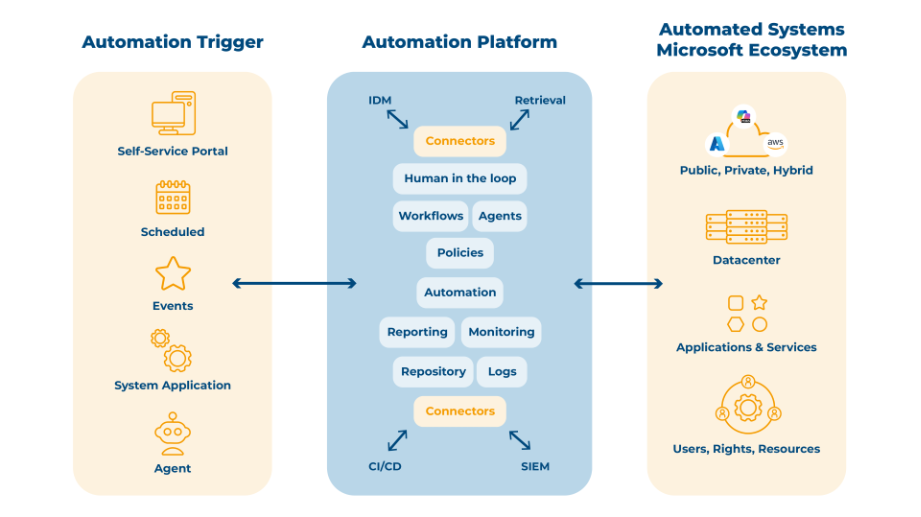
Automation Triggers: Where Automation Begins
Triggers are the starting point. They represent why automation runs, and each type comes with different requirements in terms of governance, speed, and flexibility.
Modern enterprises typically use four categories of triggers:
- Human/Self-Service: employees independently initiate tasks through a portal, service catalog, or within an app.
- Scheduled: time-based automations run daily, hourly, weekly, or at fixed intervals. This is the oldest and most established trigger type.
- Event-Based: a change in an application, data set, or system environment triggers immediate automated action.
- Agentic (The Fastest-Growing Category): AI agents interpret context autonomously and initiate the right automation, with or without human-in-the-loop input.
The Automation Engine: Where Governance Meets Execution
The automation engine is the brain and nervous system of the entire operation. This is where ScriptRunner plays its most important role.
The automation engine performs several essential jobs:
- Central Orchestration: coordinating scripts, workflows, policies, and approvals across every automation.
- Governance Enforcement: ensuring every automation, no matter the trigger or system, runs through the same policies and security controls, such as:
- Role-Based Access Controls
- Script signing
- Approval workflows (human-in-the-loop)
- Policy enforcement
- Comprehensive logging
This is what turns automation from an ad-hoc tool into a system secure enough to be integrated into enterprise-grade business infrastructure.
- Execution Management: determining which workflow or task should run, what parameters apply, which credentials to use, and how results should be logged.
- Self-Service Delegation Interface: making pre-approved automation workflows available for employees across the organization to run safely and securely, without requiring admin privileges or customization.
- Helper Systems: integrating with surrounding tools to enrich decisions and maintain compliance, for example:
- IDM/IAM: Identity directories, permission stores
- SIEM: Logging, alerting, anomaly detection
- CI/CD systems: Script deployment, version control
- Monitoring tools: Drift detection, performance metrics
- Output Systems: making executions visible and actionable, with monitoring dashboards, ticketing system updates, notifications, repository updates, and reporting for audits.
This engine allows automation to scale safely and efficiently, especially as AI agents begin initiating more workflows autonomously.
Automated Systems Tasks: Where the Value Appears
Finally, the automation engine interacts with the organization’s systems, such as the Microsoft ecosystem and beyond.
Automation typically acts on:
- Cloud Systems: Azure, Microsoft 365, Entra ID, Intune
- Data Center Systems: Servers, VMs, SQL instances, on-prem AD
- Hybrid Environments: Where cloud + on-prem need synchronized operations
- Applications & Services: Exchange, Teams, SharePoint, line-of-business apps
- Users, Resources, Rights, and More: Accounts, licenses, devices, configurations, and policies.
This is the value-creation layer, where automation runs to create a visible, measurable impact on business operations.
Putting It All Together: The Automation Fabric
When all aspects of the system operate together under a central automation platform, automations can run safely and securely alongside full-scale business processes, with as much or as little human intervention as required. With this, organizations gain:
- Faster service delivery and fewer errors
- Lower operational overhead, with more efficient teams
- Higher reuse of automation assets across the enterprise
- Strong governance and compliance, with reduced Shadow IT
- Readiness for agentic automation
ScriptRunner sits in the middle of this, acting as the automation control center that makes all automation efforts predictable, governed, and scalable.
For an example in action, see our success story with Bechtle.
Coming Up Next
The next articles in the series will delve into each dimension of this automation fabric:
Part 2: Automation Trigger Types
Human, Scheduled, Event-Based, Agentic: when, why, and how to use each of them.
Part 3: Inside the Automation Engine
Exploring the components of an enterprise-grade automation engine, plus helper/output systems.
Part 4: Automated Systems Across the Microsoft Ecosystem
Surveying various use cases for cross-departmental service automation.
To start building a modern automation system with robust governance for all automation across the enterprise, book a meeting today.