.svg)


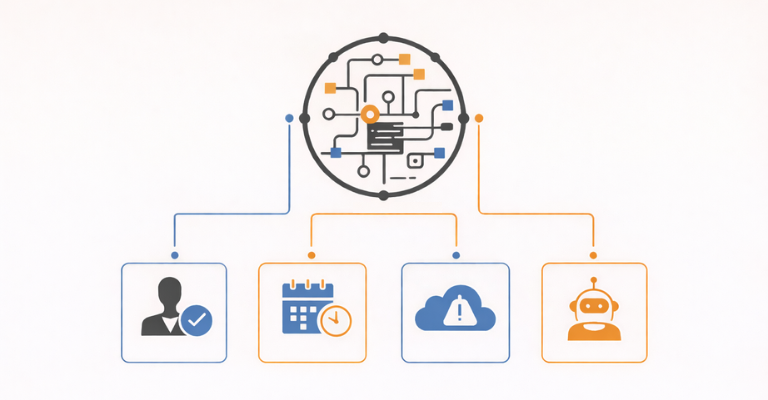

In modern infrastructure automation, a trigger is the starting point for executing automated tasks and workflows. Triggers determine when automation runs, why it runs, and how automated processes tie into real business operations.
There are four standard automation trigger types:
- Human-Initiated
- Scheduled
- Event-Driven
- Agent-Initiated
For enterprises operating across complex Microsoft ecosystems, understanding and governing these triggers is essential.
Without a clear model for trigger types, even the most powerful scripts and workflows become inconsistent, difficult to maintain, and nearly impossible to scale safely. On the other hand, with the right trigger architecture in place, automation becomes predictable, compliant, and reliably tied to business value.
Part 2 of our series explores the four major types of automation triggers in a modern platform like ScriptRunner, and what IT teams should consider when designing a resilient and scalable automation strategy.
1. Human-Initiated Automation
Many foundational automation workflows begin with a deliberate human request, seeking assistance with tasks such as resetting a password, provisioning a user, assigning group membership, or granting temporary access to a resource.
These requests are repetitive, predictable, and ideal for structured self-service automation.
Human-triggered automation can take multiple forms:
- Direct self-service, such as a help desk engineer running a task or workflow through a dedicated automation portal.
- End-user self-service, via widgets embedded in intranet pages, HR platforms, or other service portals.
- Indirect/application-driven, where users interact with workflows in apps such as ITSM or HR systems that call an automation engine behind the scenes.
No matter where the request originates, human-triggered automation always requires an intuitive UI and a clean input mechanism.
ScriptRunner provides exactly that through:
- An easy-to-use centralized portal, as well as embeddable widgets for connected apps.
- Automatically generated input forms built dynamically from scripts and workflows.
- A form editor for designing custom interfaces and advanced form logic.
- Query-based input selection, since most users don’t know the valid values for fields like groups, sites, policies, or roles.
- Role-based visibility ensuring users only see the actions they are authorized to run.
- Input validation preventing malformed or unsafe data from being submitted.
- Injection prevention ensuring users cannot insert code or harmful commands via form inputs.
- Stored execution policies and consistent logging for every action.
- Approval workflows for sensitive, high-impact, or privileged actions.
- Execution deferral allowing automations to be scheduled for a later time.
- Real-time feedback and log access tailored to the user’s assigned role.
ScriptRunner’s governed self-service model gives non-technical users the ability to execute powerful automations safely, without risking misuse of privileges or configuration drift.
When implemented according to best practices, human-triggered automation becomes one of the most scalable and secure trigger types in the enterprise, helping users to complete tasks quickly and efficiently on demand.
2. Scheduled Automation
Scheduled (or time-based) automation is one of the oldest forms of automation, dating back to mainframe systems and remaining foundational today. It accommodates the fact that many IT and business processes follow predictable temporal patterns, such as:
- Executing daily data processing jobs.
- Cleaning up stale resources every Monday or Friday.
- Running reports on the last day of the month.
CRON-style scheduling remains the de facto standard for defining these patterns.
In many organizations, schedules are still configured independently across different servers and tools. Scripts live locally, secrets are transferred manually, access control varies from one endpoint to another, and logs are scattered in multiple locations. As a result, drift accumulates as systems change, making traceability and compliance extremely difficult, or even impossible.
A modern automation environment replaces this fragmented approach with a centralized scheduling engine. As an example of this, ScriptRunner allows organizations to:
- Configure, run, and manage all schedules centrally, executing scheduled automations across on-premises, cloud, and hybrid systems.
- Run multiple schedules for the same task, each with different parameters and execution logic.
- Use diverse schedule patterns, including CRON expressions.
- Pause or disable schedules immediately or during planned maintenance windows.
- Automatically delay workloads to green-energy windows, improving energy efficiency and sustainability alignment.
- Apply stored governance policies consistently to every scheduled action.
- View centralized logs and reporting for complete traceability.
With centralized scheduling in place, organizations eliminate the configuration drift, privilege misalignment, and maintenance burdens that plague decentralized models. As a result, time-based automation becomes more reliable, auditable, and easier to scale.
3. Event-Driven Automation
Event-driven automation allows systems to react to real-time changes. These triggers occur when monitoring tools, business applications, backend systems, custom software, or client devices detect a condition that requires immediate remediation, adjustment, or processing.
Common examples in the Microsoft ecosystem include:
- HR system onboarding events triggering a full provisioning workflow.
- Intune detecting endpoint configuration drift and launching a remediation script.
- Azure Monitor raising an alert that prompts investigation and corrective action.
- Changes to AD attributes automatically updating permissions.
- Device monitoring detecting suspicious activity and isolating a device or account.
A modern automation platform like ScriptRunner ensures that every event-triggered workflow executes securely by providing:
- A web service connector for calling automated tasks and workflows from external systems.
- Multiple security layers including source identification, authentication, and role-based authorization.
- Strict access controls, ensuring event sources can only trigger assigned automations.
- Guardrails and policies to prevent over-reactive or malicious trigger parameters.
- Approval functions for event-driven tasks requiring oversight.
- A comprehensive UI for easy integration with calling systems.
- Centralized logging, monitoring, and reporting.
Event-triggered automation forms the nervous system of zero-touch operations. As organizations shift toward agentic automation, event signals become even more important, providing the real-time context that AI agents rely on.
4. Agentic Automation
Agentic automation represents the newest and most transformative category. Unlike traditional automations that require predefined inputs or explicit scheduling, AI agents autonomously analyze context, detect anomalies, interpret natural language, reason about conditions, and trigger the corresponding automated tasks.
AI agent triggers may originate from:
- Internal agents embedded directly into automation workflows, executing tasks autonomously using connected tools, reaching out to external systems via a MCP (Multi-Connector Protocol), or engaged directly via a chat interface.
- External enterprise agents in platforms like ServiceNow, SAP, monitoring systems, SIEM tools, or LLM-based copilots, which use MCP to call internal workflows and automated tasks.
To operate safely at machine speed, agentic automation requires a tightly governed execution environment. ScriptRunner enforces this through:
- The ScriptRunner MCP Server, which publishes workflows and tasks, including specific parameters, to external systems.
- MCP-based execution with multi-layered security, including caller identification, authentication, and role-based authorization.
- Guardrail agents that inspect and block unauthorized or unsafe actions.
- A clear UI for validating agent-triggered calls, ensuring transparency for debugging and governance.
- Human-in-the-loop and approval workflows for sensitive or high-risk tasks.
- Stored execution policies and full logging for every agent-triggered action.
- Centralized monitoring for complete visibility.
Agentic automation becomes enterprise-ready only when autonomy is balanced with strict governance. ScriptRunner provides that balance.
Bringing the Trigger Types Together Under a Unified Framework
Whether automation is triggered by a human, a schedule, a system event, or an AI agent, every workflow must run through a centralized execution engine that ensures safety, consistency, and compliance. This is exactly what ScriptRunner provides.
Triggers define the when and the why. ScriptRunner defines the how. By unifying governance, identity management, approval workflows, execution policies, logging, and monitoring under a single platform, ScriptRunner ensures that every automation executes predictably, securely, and in alignment with business intent no matter how it begins.
In Part 3 of this series, we’ll explore the ScriptRunner automation engine itself: how workflows are constructed, how helper systems integrate with it, and how to architect an automation strategy built for the use of agentic automation.
If you’re ready to build an automation system that supports security, compliance, and enterprise-grade performance, book a meeting.