.svg)



If you have been running automation in production for a while, you already know the uncomfortable truth: scripts tend to grow faster than governance around them.
PowerShell code lives in different places, multiple admins can change it, and scripts are executed manually, on schedules, or via self-service portals. Sooner or later, someone asks, “Who changed this and who actually ran it?”
Without a proper audit trail for both changes and executions, answering that question becomes guesswork. ScriptRunner’s audit functionality is designed to close this gap by adding built-in traceability, execution reporting, and role-based control to enterprise automation.
The Reality Without Centralized Auditing and Execution Tracking
In many environments, automation starts small and evolves organically. Over time, this leads to a familiar set of problems:
- Script changes are made directly in production with no clear version history
- Executions run under shared credentials with little accountability
- There is no central view of when, how often, or by whom scripts are executed
- Reporting for audits or management requires manual log collection
For system administrators and system engineers, this usually means reacting instead of controlling, especially when an unexpected change hits production.
ScriptRunner Audit: More Than Just Change Management
ScriptRunner treats auditing as a platform-wide capability. It doesn’t only track configuration changes, but also who executed what, when, where, and with which parameters. Everything is logged centrally and consistently.
Action Change History: Knowing Exactly What Changed
Actions are the core automation building blocks in ScriptRunner, and their change history is tracked automatically.
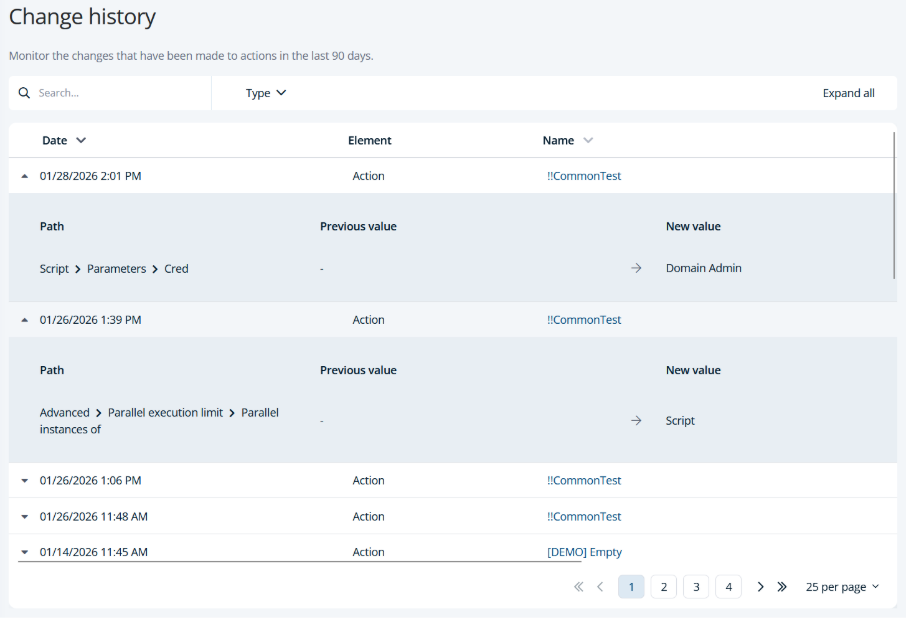
This includes:
- Script content modifications
- Parameter definitions and defaults
- Target systems and execution credentials
- Approval and release status changes
Each change is timestamped and linked to a specific user. For experienced admins, this removes ambiguity when troubleshooting. Instead of asking around or digging through backups, you can directly see how an Action evolved over time.
Operational benefit: Faster root-cause analysis and clean, auditable change tracking.
Execution Auditing: Who Ran What, When, and How
Change tracking alone is not enough. In real-world operations, most incidents are caused not by what changed, but by how something was executed.
ScriptRunner provides detailed execution audit logs for every Action run, whether triggered manually, scheduled, or via self-service.
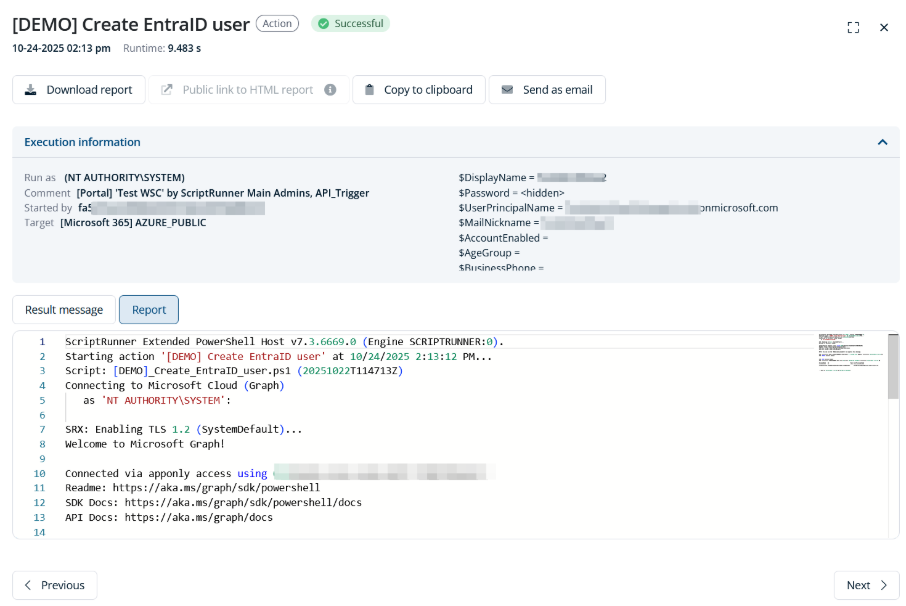
Execution Traceability
For each execution, ScriptRunner records:
- Initiating user or service
- Execution time and duration
- Target systems
- Input parameters
- Execution status and result
This gives administrators a complete execution trail. When something breaks, you can immediately answer questions like: Was this Action run today? With which parameters? Against which systems?
Operational benefit: No more blind spots when automation affects production systems.
Reporting: Turning Audit Data into Visibility
Having audit data is one thing, but being able to report on it is what makes it useful.
ScriptRunner’s centralized audit and execution data enables reporting across:
- Action usage frequency
- Execution success and failure rates
- User and role activity
- Automation coverage across systems
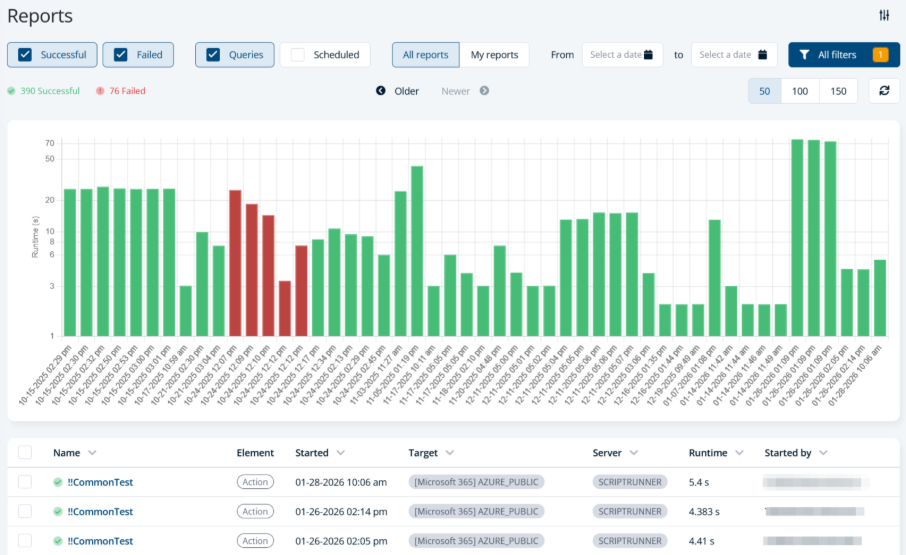
These reports are valuable not only for compliance and security teams, but also for operations. You can identify heavily used Actions, spot failing automations early, and understand how automation is actually used in the organization.
Operational benefit: Better decision-making based on real automation usage data.
Audit Data Handling: Anonymization and Retention
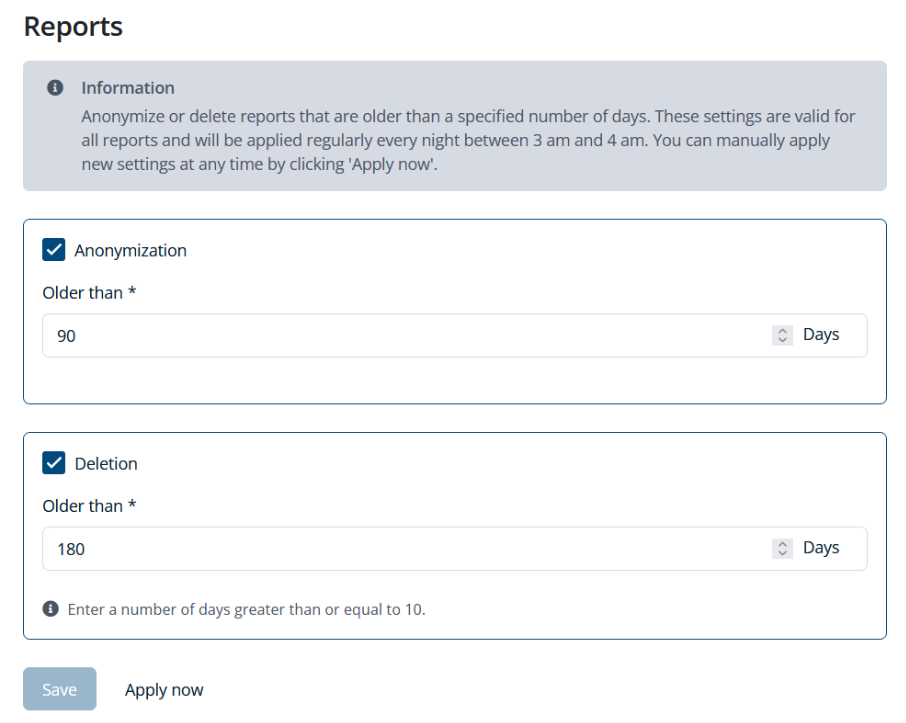
Audit and execution logs often contain sensitive information. ScriptRunner addresses this with built-in anonymization and retention controls.
Anonymization
User-related data in audit logs can be anonymized, which is especially important in environments subject to GDPR or similar regulations.
Retention Policies
Retention settings allow you to define how long audit and execution data is stored. Logs can be kept long enough for audits and reporting, while still complying with internal data policies.
Operational benefit: Compliance-ready logs without custom cleanup scripts or manual effort.
Role-Based Access to Audit and Execution Data
Not everyone should see everything, and ScriptRunner enforces this using role-based access control (RBAC).
Separation of Responsibilities
Roles define:
- Who can modify Actions
- Who can execute Actions
- Who can view execution results and audit logs
For example, operators may execute approved Actions and see their own execution results, while auditors and security teams get read-only access to audit and execution reports.
Operational benefit: Least-privilege access without blocking automation adoption.
Why This Matters in Daily Operations
For experienced system administrators, auditability is not about paperwork, it’s about confidence. When automation is auditable and reportable:
- Executions are predictable and traceable
- Changes are transparent and reversible
- Incidents are easier to investigate
- Automation can safely scale across teams
ScriptRunner’s audit and reporting capabilities turn automation into something you can trust in production, even in complex enterprise environments.
Key Takeaways
- ScriptRunner audits both changes and executions centrally
- Action change history provides full configuration traceability
- Execution logs and reports show who ran what and with which results
- Anonymization and retention support compliance and data protection
- Role-based access enforces governance without reducing productivity
Bottom Line
If automation runs critical infrastructure, you need more than scripts: you need visibility. ScriptRunner combines change tracking, execution tracing, and reporting into a single, auditable automation platform, so your automation remains controlled, transparent, and defensible.