.svg)


800.png)

Introduction: When Execution Context Suddenly Matters
If you run PowerShell centrally from a ScriptRunner service, sooner or later you will hit the same question every experienced admin does: “Why does this script work perfectly in one case, but suddenly fails when it calls an external tool?” The script itself looks fine, permissions seem correct, and yet the behavior changes depending on how it is executed. In most environments, this confusion comes from not fully understanding the local execution modes and their security context. ScriptRunner exposes this difference explicitly, which is both a strength and a responsibility.
Life Before Centralized Execution Control
Before ScriptRunner, local automation is usually a mix of scheduled tasks, manually started scripts, and tribal knowledge about “which account to use.” A script might be documented as “run as Domain Admin,” but nobody remembers why. Another script works only when launched interactively, because it silently relies on an EXE or a DLL that behaves differently outside a user logon session.
There is no central place to define how scripts are executed, under which identity, and with which guarantees. If a script breaks, the investigation often starts with guessing the execution context. This lack of transparency is not just annoying; it is a governance problem. You cannot reliably audit who executed what, under which security context, and why.
Why Ad‑Hoc Execution Models Fail in Real Environments
A common workaround is to “just run everything under the service account” or to hard‑code credentials into scripts. Both approaches scale badly. The first leads to over‑privileged service accounts, the second to credential sprawl and compliance nightmares.
Another workaround is to split scripts: one “safe” version that runs centrally and another “special” version for cases where external tools are needed. Over time, this creates parallel logic, no clear ownership, and no structured maintenance or versioning model. Knowledge gets locked into individual scripts and administrators’ heads, and productivity suffers.
What ScriptRunner Changes About Local Execution
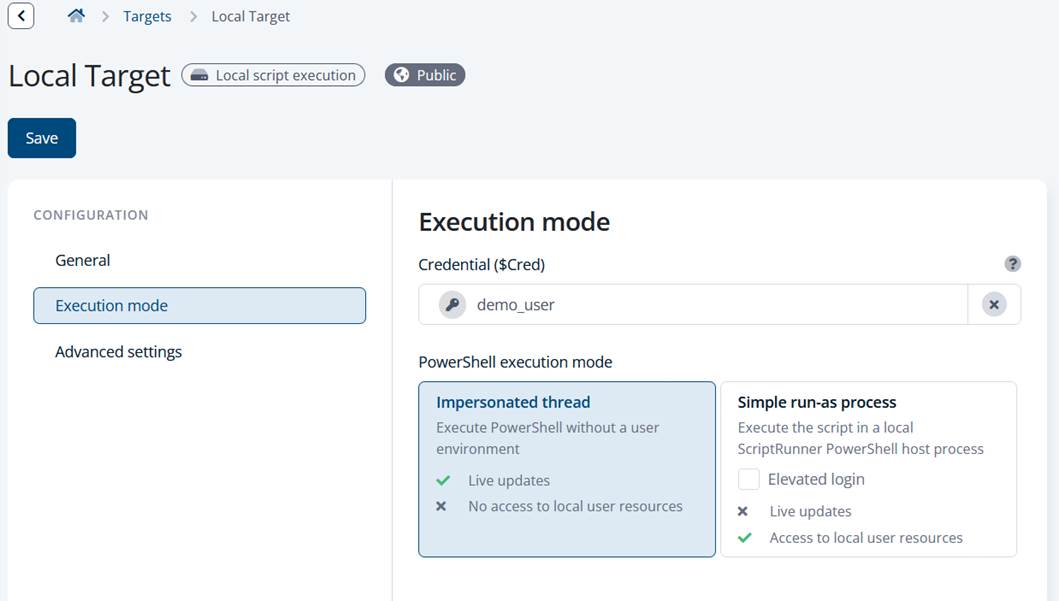
ScriptRunner makes the execution context a first‑class, configurable concept. For local service execution, two execution modes are available: Impersonated Thread and Simple Run-As Process. The choice is made explicitly in the Target Settings by selecting a user or leaving it empty. If no user is selected, execution happens in the context of the ScriptRunner service account. If a user is selected, ScriptRunner applies one of the two execution modes.
Impersonated Thread: Lightweight and Effective — With Clear Boundaries
Impersonated Thread means exactly that: ScriptRunner impersonates the selected user at the thread level inside the already running worker process. PowerShell code that is native to the engine—cmdlets, providers, .NET calls that stay inside the PowerShell runtime—executes under the impersonated identity. From an operational point of view, this is lightweight, fast, and usually requires fewer privileges on the service account.
However, there is a limitation that matters in real environments. As soon as the script calls external code, such as an EXE, a COM object, or a binary DLL loaded outside the PowerShell engine, that code may “fall out” of impersonation. In that case, it runs in the security context of the ScriptRunner service account, not the selected user. This behavior is not a ScriptRunner quirk; it is a Windows impersonation boundary that many admins only learn about the hard way.
Simple Run-As Process: Full Security Context, Full Predictability
Simple Run-As Process avoids this problem by starting a separate process under the selected user’s security token. The entire PowerShell host, including any external programs or binary dependencies, runs in the same security context. From a predictability standpoint, this is closer to how administrators expect “run as user X” to behave.
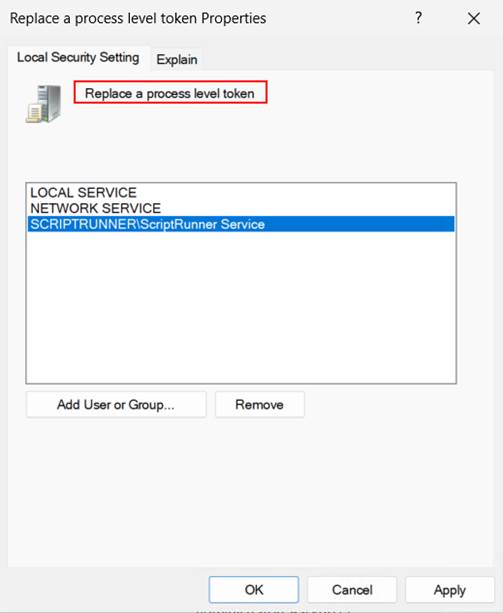
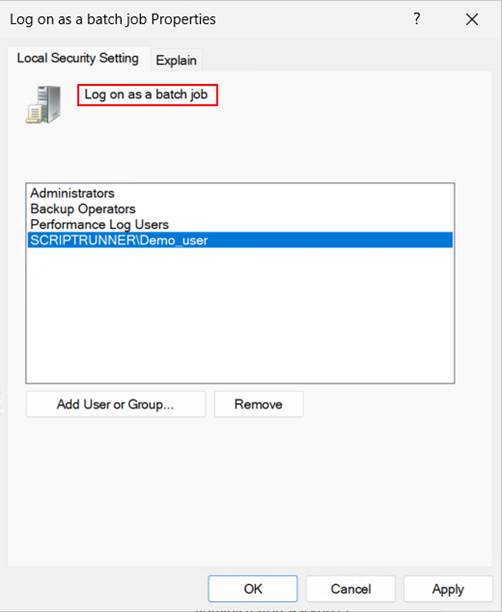
This mode does come with clear security requirements. The ScriptRunner service account must have the user right “Replace a process level token” (SeAssignPrimaryTokenPrivilege). The user being impersonated must have “Log on as a batch job.” These settings are explicit, auditable, and align well with governance-driven environments.
Key ScriptRunner features involved
The key value here is not just the execution mode itself, but the fact that ScriptRunner centralizes and standardizes it. Execution context is defined in Target Settings, not buried in script logic. The ScriptRunner service enforces the selected mode consistently, logs execution details, and makes the resulting behavior auditable.
Because scripts are stored, versioned, and executed through a central service, administrators no longer need to encode security assumptions into each script. The same script can be reused safely with different execution modes, depending on the operational requirement.
Bonus: A Practical Rule of Thumb from Production Environments
A practical guideline has emerged in many environments. If a script consists purely of PowerShell-native code, Impersonated Thread is usually the best choice. It is efficient, requires fewer privileges, and works reliably for directory operations, service management, and API-based automation.
If the script calls external programs, loads binary assemblies, or depends on vendor tools, Simple Run-As Process is the safer option. It guarantees that everything runs in the same security context, avoiding subtle and time-consuming permission issues.
Conclusion: Fewer Surprises, Better Governance, Cleaner Automation
Understanding and deliberately choosing between Impersonated Thread and Simple Run-As Process removes a whole class of “it works on my machine” problems. ScriptRunner turns execution context into a governed, transparent configuration item rather than an implicit side effect.
The long-term benefits are clear: predictable behavior, fewer over‑privileged accounts, better auditability, and less time wasted debugging permission issues. Most importantly, knowledge about how and why scripts run under certain identities is no longer locked inside individual scripts or specific administrators. It becomes part of a controlled, enterprise-ready automation platform.
Take the next step in your automation journey
Choosing the right execution mode is not just a technical detail, it directly impacts reliability and security. If you want to see how ScriptRunner helps you standardize execution context across your environment, book a demo or connect with our experts.