.svg)




In the previous parts of this series, we explored how assigning appropriate .NET types works and how this can help you parse, compare, and verify data correctly. It can also help you conserve resources such as memory and improve performance.
Understanding Numeric Types
Most scripts work with numeric data, and PowerShell automatically assigns numbers to the types [int32], [int64], and [double].
If you want to determine the actual .NET type PowerShell is using, try this:
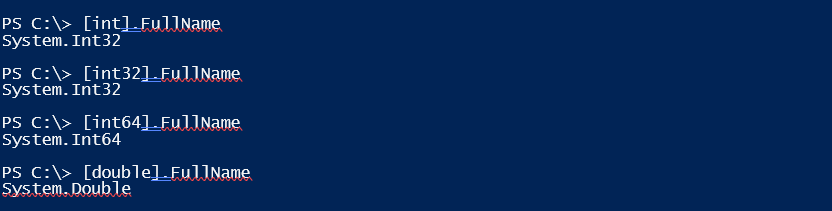
In PowerShell, you can omit System., and [int] is simply a shorthand alias for the actual .NET type Int32.
Each numeric type also specifies its range. Here’s an example:
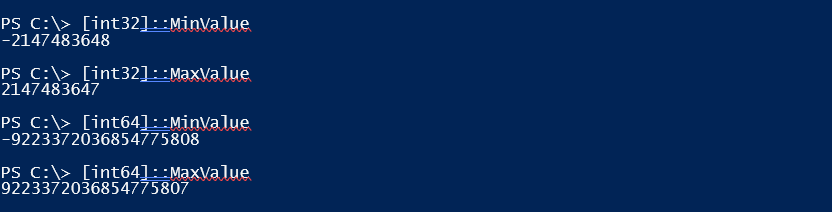
As you can see, the difference between [Int32] and [Int64] is simply the numeric range: [Int64] can store larger numbers because it uses 64 bits instead of 32.
PowerShell automatically optimizes memory usage to some extent:

Once a number exceeds the range of [Int32], PowerShell automatically selects [Int64] instead of using [Int64] by default and wasting 64 bits for every number.
Using Better Numeric Types
You can optimize memory usage even further, but keep in mind that this only conserves a significant amount of memory when working with large datasets. It also brings another benefit, which we’ll discuss at the end. For now, let’s take a closer look:
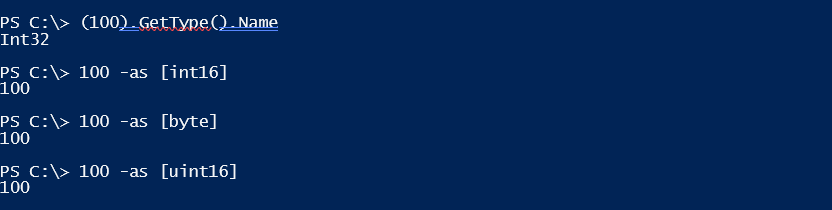
The number 100 is stored as [Int32] by default, consuming 32 bits. However, it can also be represented by other .NET types, such as [Int16] (16 bits) or [Byte] (8 bits). The difference, as before, is the numeric range:
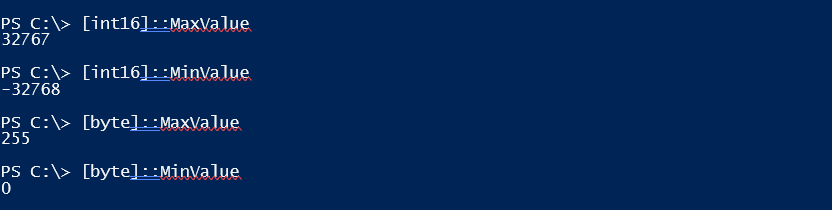
Choosing an alternate data type makes sense only if its numeric range suits your purpose.
Unsigned Data Types
A particularly interesting group of .NET types are the unsigned ones. Often, you work with numeric data that can only be positive. Standard types like [Int32] or [Int64] waste half their memory on negative numbers.
By simply adding a “U” to the type, you make it unsigned: its numeric range shifts to start at 0. It can now store only positive numbers, but its range is effectively doubled - without using any additional memory:
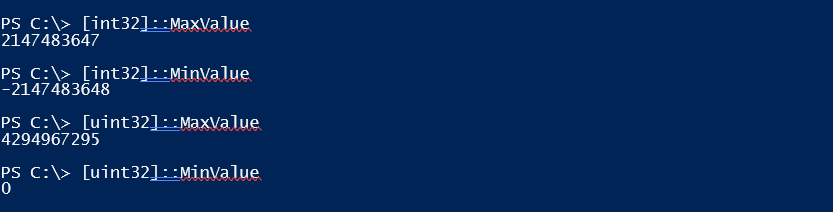
Note that [Byte] is also an unsigned data type, even though its name does not start with “u”.
Data Verification
Optimizing memory usage for variables is certainly commendable, but usually unnecessary. More importantly, the verification capabilities of .NET types can be very useful.
For example, if you want a user to enter a numeric value, simply choosing a .NET type with the appropriate numeric range handles the verification. In this typical code snippet, the user is required to enter a number; however, very large or negative numbers can still be entered:
param
(
    [Parameter(Mandatory)]
    [byte]
    $IDNumber
)

"You entered: $IDNumber"

With this code, only numbers in the range 0–255 are allowed. If you need a larger range, use [UInt16] instead of [Byte], which increases the range to 0–65535.
For even more control, you can apply a [ValidateRange()] attribute. This example restricts input to numbers between 1 and 1000:
param
(
    [ValidateRange(1,1000)]
    [Parameter(Mandatory)]
    [uint16]
    $IDNumber
)

"You entered: $IDNumber"
Apply to Variables
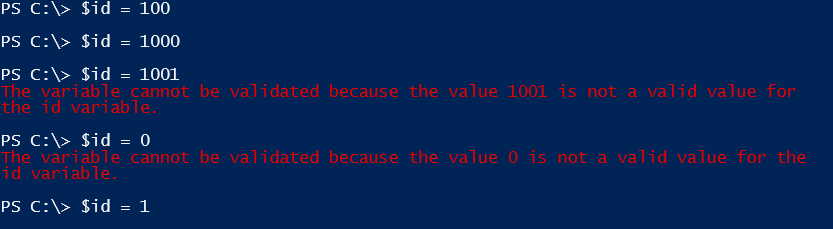
All of the concepts discussed also apply to regular variables to improve robustness. For example, the variable $id in the example below accepts only values between 1 and 1000:
[ValidateRange(1,1000)][uint16]$id = 1If a number is assigned outside this range for any reason, an exception is raised:
Related links
- ScriptRunner ActionPacks will help you automate tasks
- Try out ScriptRunner here
- ScriptRunner: Book a demo with our product experts