.svg)




In Part 1, you saw how simple it can be to use .NET types to offload complex tasks and improve your scripts. Let’s now take a closer look at how to assign new types to your data.
In Part 1, the -as operator was used: it converts a value to a new type, and if the value cannot be converted, it returns $null. This is what programmers call a “trycast.”

Another way to convert types is to place the type directly before the value:

Subtle Differences
Did you notice the difference in outcome? Both approaches have subtle but important distinctions.
One key difference is culture: -as respects your current culture, whereas specifying the type directly always uses US culture. This matters when handling culture-specific information such as dates. For example, on a German system, -as interprets dates in day–month–year format, while using the type directly interprets them in US-style month–day–year format.
Another difference is how each approach behaves when type conversion fails:
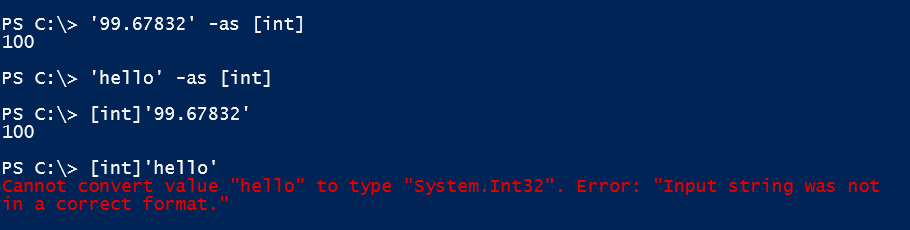
-as simply tries to convert a value, and if it fails, it silently returns $null. Specifying a type directly enforces the conversion, and if it fails, an exception is raised. This is what programmers call a “cast”: when it fails, you are alerted by the exception.
Writing Robust Scripts
By assigning a type to a variable, you can “strongly type” it: from that point on, it only accepts the designated type. When you assign a different value, PowerShell automatically casts it to the specified type. If the value is incompatible, an exception is thrown.
This provides a major benefit: if unexpected data is assigned to a variable, it no longer silently accepts it and potentially causes errors elsewhere in your script. Instead, you are immediately notified by an exception at the point where the issue occurs:
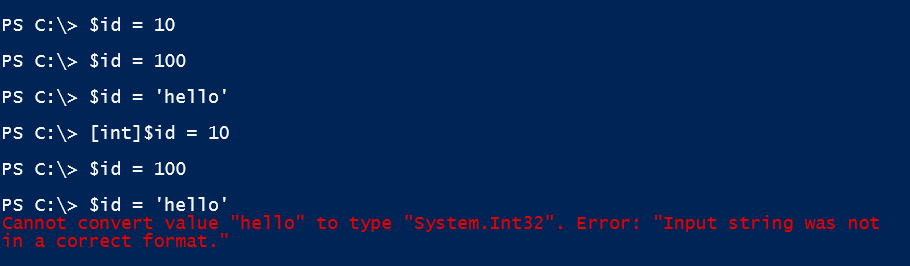
As you can see, a regular variable accepts any value. Once you strongly type a variable by specifying its type, it only accepts values of that type. If an incompatible value is assigned, an exception is raised.
If a value is not of the designated type but can be converted, the variable performs an “implicit” conversion. In this example, assigning a floating-point number does not trigger an exception; instead, the variable converts it to an integer:

In summary, it isn’t necessary to strongly type every variable in your script. However, assigning types to key variables can help make your scripts more resilient and reliable.
Related links
- ScriptRunner ActionPacks will help you automate tasks
- Try out ScriptRunner here
- ScriptRunner: Book a demo with our product experts