.svg)



If you’ve ever tried to lock down administrative access on Windows servers, you already know where things usually fall apart: someone still needs “temporary” local admin rights to fix something. Over time, those temporary permissions become permanent, service accounts get reused across systems, and audit questions turn into uncomfortable conversations. Just Enough Administration (JEA) promises a cleaner model, but deploying and operating JEA consistently across many servers is where most environments struggle. This is where ScriptRunner changes the operational reality.
Everyday Reality Without ScriptRunner
In many enterprises, JEA exists on paper but not in day‑to‑day operations. Admins know the theory: restrict commands, use role capabilities, avoid handing out full administrator rights. In practice, remote administration still relies on a mix of PowerShell remoting, scheduled tasks, and long‑lived service accounts with broad permissions.
A typical setup looks like this:
Scripts connect remotely to servers using domain admin credentials or a highly privileged service account. Those scripts may technically perform safe actions, but the identity behind them can do far more. JEA endpoints might exist on a few systems, but they’re rarely used consistently by automation tools because each endpoint must be registered, maintained, and kept in sync. Over time, scripts drift, endpoints break, and admins fall back to “what works”.
From a governance perspective, this creates multiple issues. There’s no central view of who can trigger which actions on which servers. Script permissions are defined inside individual files. Auditors see privileged accounts executing remote commands, but can’t easily tell whether least‑privilege principles were actually enforced.
Why Traditional Approaches Don’t Hold Up
Many teams try to solve this with conventions and documentation. Scripts are stored in a shared repository. Naming standards imply what a script is allowed to do. Some environments even mandate JEA usage in scripts by policy.
None of that scales reliably.
Stand‑alone PowerShell scripts don’t enforce governance; they rely on whoever runs them to follow the rules. Scheduled tasks hide execution context and often run under overly powerful accounts. When JEA endpoints change, every consuming script must be updated manually. Knowledge about which endpoint exists where often lives with a single administrator who originally built it.
Even when JEA is implemented correctly, operating it across dozens or hundreds of servers becomes an administrative burden. Registering session configurations, managing group‑managed service accounts, and keeping role definitions aligned across systems is not something most teams want to do by hand.
How ScriptRunner Applies JEA in a Controlled Way
ScriptRunner approaches this from the automation platform side rather than the server side. Instead of letting scripts decide how they connect to remote systems, ScriptRunner defines remote targets as managed objects with a fixed execution model.
When you configure a Windows remote target in ScriptRunner to use JEA, ScriptRunner can explicitly connect to a named JEA session configuration registered on the target system. That endpoint defines exactly which commands are available and under which identity they run.
Crucially, ScriptRunner supports using group‑managed service accounts as the execution identity behind JEA endpoints. This aligns directly with Microsoft’s recommended JEA architecture. The gMSA is never exposed to administrators, never hard‑coded into scripts, and never reused outside its intended scope. Password management and rotation are handled by Active Directory, not by human processes.
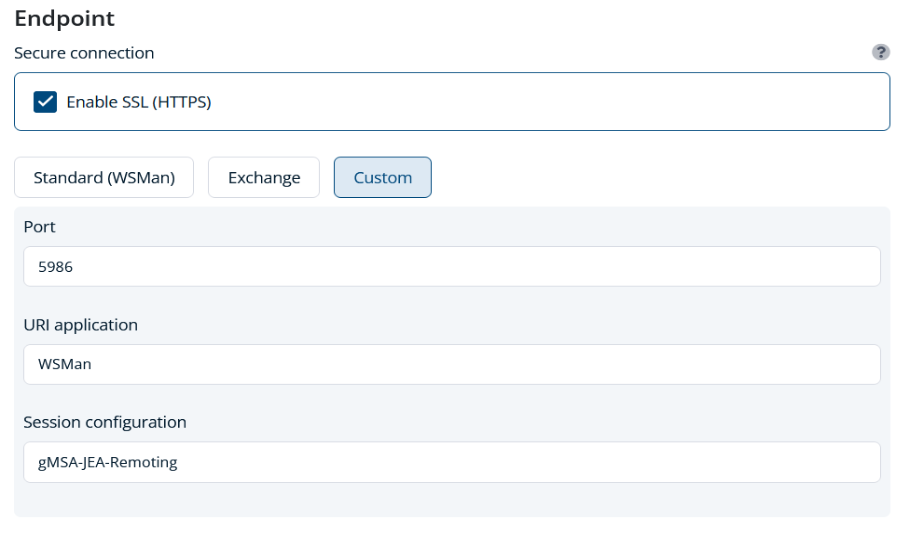
From ScriptRunner’s perspective, the automation task is simple: execute a script against a remote target using a defined endpoint. From the server’s perspective, every incoming connection is constrained by JEA’s role capabilities, language mode, and identity model.
ScriptRunner Mechanics That Make JEA Operational
The first key concept is remote targets. Instead of embedding connection logic in scripts, ScriptRunner centralizes it. The choice of JEA endpoint, authentication method, and execution context is defined once and reused consistently.
The second is separation of concerns. Scripts in ScriptRunner don’t need to know whether they are running locally, remotely, or through JEA. They simply perform a task. Security enforcement happens outside the script, in the endpoint configuration and the ScriptRunner target definition.
Third, ScriptRunner provides execution control and auditing on top of JEA. JEA itself logs what commands were executed within a session. ScriptRunner adds another layer: who triggered the execution, when it ran, against which target, and with what parameters. This closes a common audit gap where JEA logs exist but aren’t tied to a specific operational request.
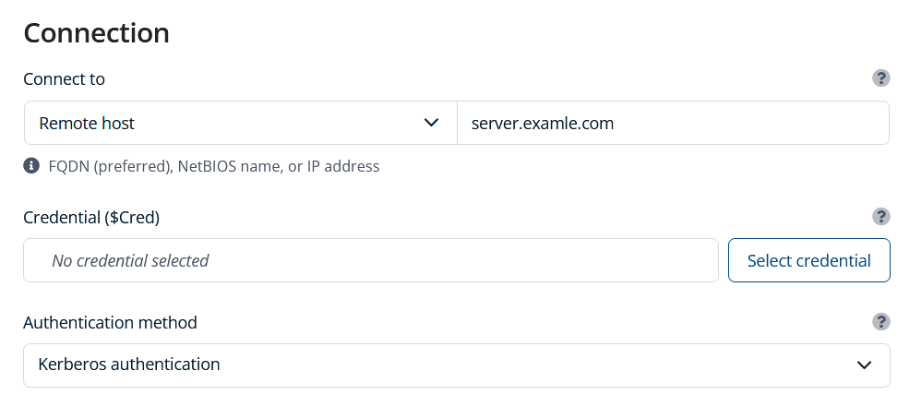
Finally, ScriptRunner brings lifecycle management. When a JEA endpoint changes, you update the target configuration, not dozens of scripts. When a gMSA needs to be replaced or scoped differently, you adjust it centrally and re‑register the endpoint on the affected systems.
Conclusion and Operational Benefits
Using JEA on remote targets through ScriptRunner turns delegated administration from a fragile security concept into an operationally viable model. Privileged access is enforced at the endpoint, not implied by a script or a service account. Automation runs under tightly scoped identities without exposing credentials or relying on shared admin accounts.
From a governance standpoint, this delivers clear wins: consistent least‑privilege enforcement, auditable execution paths, and a defensible story for compliance reviews. From an operational standpoint, it reduces friction. Admins stop reinventing connection logic, scripts become simpler, and knowledge about security boundaries is no longer locked in someone’s head.
Most importantly, it makes JEA usable at scale. Instead of being a one‑off hardening exercise, JEA becomes a standard execution model for remote automation—centrally controlled, repeatable, and supportable over the long term.
Turn least‑privilege from policy into practice. Book a meeting with us.