.svg)



Introduction
Most administrators have encountered the same frustrating situation: a PowerShell script works perfectly in an interactive console session, but fails the moment it runs through scheduled automation or delegated execution. The problem usually appears when scripts depend on a fully initialized user environment, user-scoped modules, profile-dependent settings, mapped drives, or authentication contexts that behave differently under impersonation.
In larger environments, these inconsistencies become operational debt. Administrators start building exceptions into scripts, maintaining separate execution methods, or documenting “special cases” that only a few senior engineers truly understand.
Loopback remoting in ScriptRunner addresses exactly this class of problem by changing how scripts are executed locally on the target system.
Why Local Script Execution Often Breaks in Enterprise Environments
Traditional PowerShell automation in Windows environments commonly relies on one of three models:
- Local execution under a service account
- Impersonated execution using credentials
- RunAs-style execution contexts
All three approaches work for simple administrative tasks, but they start showing limitations once scripts become dependent on a real interactive user session behavior.
A common example is legacy snap-ins, vendor-specific PowerShell SDKs, or internally developed scripts that expect a complete user profile environment. Under impersonation, PowerShell does not create a fully isolated user logon session in the same way as a true remote session. Environment variables, profile loading, Kerberos delegation behavior, module auto-loading, registry hive access, and credential handling may behave differently.
In practice, this leads to the classic administrator complaint:
"It works when I RDP into the server and run it manually."
At small scale, teams compensate with tribal knowledge. Certain scripts are only maintained by one administrator. Some tasks must always be started manually. Others require undocumented workarounds or dedicated jump servers. Over time, governance disappears because nobody fully trusts the automation anymore.
The problem becomes even more visible during audits. There is no centralized execution model, no reliable reporting on who executed what, and no consistent method for reproducing script behavior across systems.
How Loopback Remoting in ScriptRunner Changes the Execution Model
ScriptRunner supports PowerShell remoting as an execution mechanism, including loopback remoting. Additional to executing a script directly inside the local service process or impersonated thread, ScriptRunner can create a proper PowerShell remoting session back to the same machine.
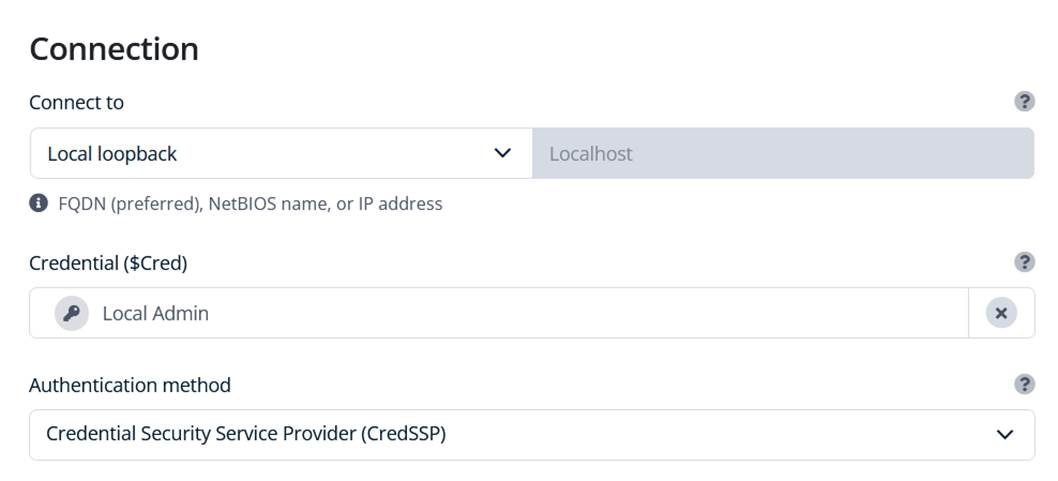
Technically, this means the script runs through WinRM as if it were a remote PowerShell session — even though the target system is the local server itself.
This distinction matters much more than many administrators initially realize.
Because the execution occurs inside a real remoting session, Windows creates a full user environment comparable to an actual remote login. The resulting behavior is significantly closer to true interactive execution than classic local automation methods.
In production environments, this solves several long-standing issues:
- User profile loading behaves consistently
- PowerShell profiles and user-scoped modules are available
- Kerberos authentication handling is more predictable
- Vendor modules that fail under impersonation often work correctly
- Session-specific environment dependencies are preserved
For administrators migrating legacy operational scripts into centralized automation, loopback remoting often becomes the compatibility layer that finally makes standardization possible.
Why This Matters for PowerShell 7 Adoption
The second major use case is PowerShell version separation.
Many organizations now operate mixed environments where Windows PowerShell 5.1 is still required for legacy modules, while newer automation is developed in a specific version of PowerShell 7. Running both reliably on the same automation platform can become difficult when execution models are inconsistent.
Loopback remoting provides a clean separation because ScriptRunner can establish remoting sessions using different PowerShell runtimes. This allows administrators to execute actions explicitly through PowerShell 7 while keeping older tasks on Windows PowerShell where necessary.
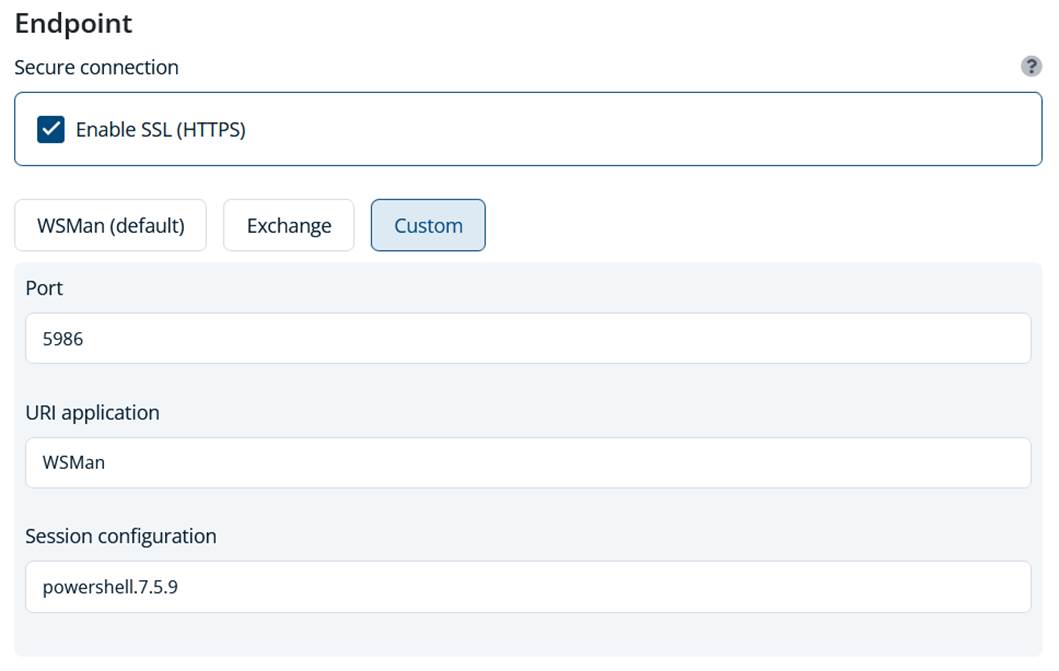
Operationally, this is much cleaner than maintaining parallel task schedulers, separate automation hosts, or manually forcing executable paths in scripts.
It also improves long-term maintainability. The PowerShell runtime becomes part of the controlled execution configuration instead of hidden implementation logic inside individual scripts.
From Ad-Hoc Automation to Controlled Operations
The biggest operational improvement is not simply technical compatibility. It is standardization.
Once loopback remoting becomes the default execution pattern for problematic scripts, administrators gain a predictable runtime model across environments. ScriptRunner centralizes the execution configuration, credentials, logging, and permissions around that model.
This directly addresses several governance problems common in enterprise scripting:
- Script execution is centrally controlled
- Actions are auditable and reportable
- Credential usage is standardized
- Runtime behavior becomes reproducible
- Knowledge is no longer tied to one administrator’s workstation setup
Instead of troubleshooting invisible environmental differences between servers, teams can define consistent execution behavior centrally within ScriptRunner.
Important Limitations of Loopback Remoting
Loopback remoting is not magic, and it inherits the normal limitations of Windows PowerShell remoting.
The most important requirement is WinRM. The target system must have PowerShell remoting configured and accessible locally. In hardened environments, this may require additional firewall rules, listener configuration, or endpoint permissions.
Authentication behavior also follows standard remoting rules. The well-known “second hop” problem still applies. If a script running in a loopback remoting session needs to access another remote resource using integrated authentication, Kerberos delegation constraints may appear unless CredSSP, Kerberos constrained delegation, or alternative authentication methods are configured appropriately.
Administrators should also remember that remoting endpoints and session configurations determine permissions. Access to custom endpoints, Just Enough Administration (JEA), or constrained session configurations can affect script behavior.
Finally, loopback remoting introduces slightly more overhead than direct local execution because PowerShell creates a full remoting session pipeline. In most administrative automation scenarios this overhead is negligible, but it is worth understanding for high-frequency execution workloads.
Conclusion
Loopback remoting in ScriptRunner solves a very specific but extremely common enterprise automation problem: scripts that depend on a real user execution environment and fail under traditional local automation methods.
By executing actions through a proper PowerShell remoting session — even locally — ScriptRunner provides behavior much closer to interactive execution while still maintaining centralized governance, auditing, and operational control.
The approach is especially valuable in mixed PowerShell 5.1 and PowerShell 7 environments, where execution consistency matters as much as script functionality itself.
For many IT teams, loopback remoting becomes the missing piece that finally allows legacy operational scripts to move from fragile administrator-owned tooling into a maintainable, enterprise-ready automation platform.
Curious how ScriptRunner can help you move from ad hoc scripting to a centralized automation platform? Book a personal demo and discuss your specific requirements with our experts.