.svg)



With ScriptRunner 8.2, you gain deeper visibility into your automation environment, more flexibility in how actions are presented to users, and new ways to tailor ScriptRunner to your daily work. Centralized activity monitoring and extended change tracking provide greater transparency, while the new form editor and configurable Live Monitor dashboards give administrators more control over the user and monitoring experience.
The release also expands configuration and administration capabilities with the first version of the ScriptRunnerCli module, and access group impersonation. Alongside these major additions, improvements to the Portal streamline everyday tasks, while the move to .NET 10 provides an updated technical foundation for ScriptRunner.
Key features
Gain visibility into activities across your ScriptRunner environment
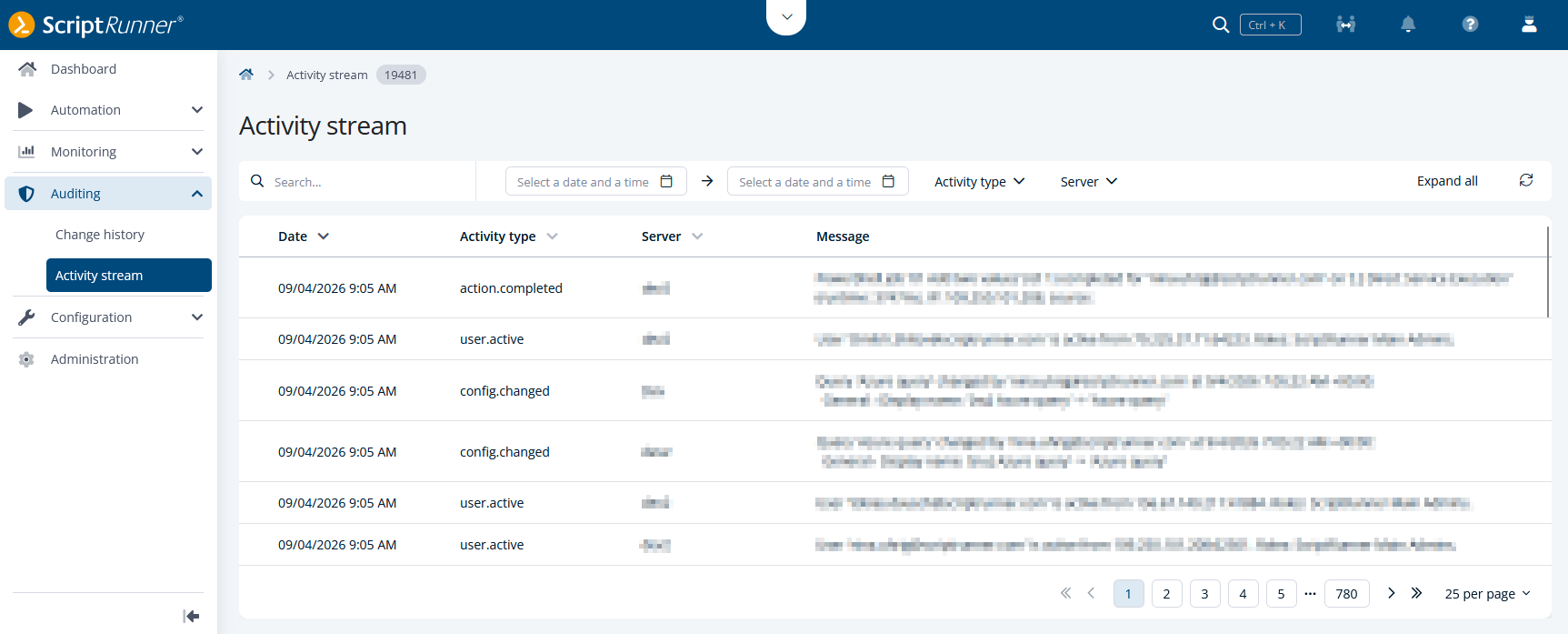
ScriptRunner 8.2 introduces the new SIEM & Observability feature, providing centralized visibility into activities and events across your ScriptRunner environment. Available with a SIEM & Observability license, the feature includes the Activity stream in the new Auditing area of the Portal, where main administrators can review action executions, configuration changes, Portal administration activities, user activity, and access-related events in a structured, chronological view.
Whether reviewing recent changes, investigating unexpected behavior, or tracing administrative actions, the activity stream makes it easier to understand what is happening across the environment from a single location.
The feature also includes an OpenTelemetry-based connector that forwards these events to external SIEM and observability platforms such as Microsoft Sentinel, Splunk, Elastic, and other compatible solutions. This allows security and operations teams to correlate ScriptRunner activities with events from other applications, infrastructure components, and security systems.
Together, these capabilities help organizations integrate ScriptRunner into their existing monitoring, auditing, and compliance processes while providing greater transparency into automation-related activities.
Create intuitive action forms without changing scripts
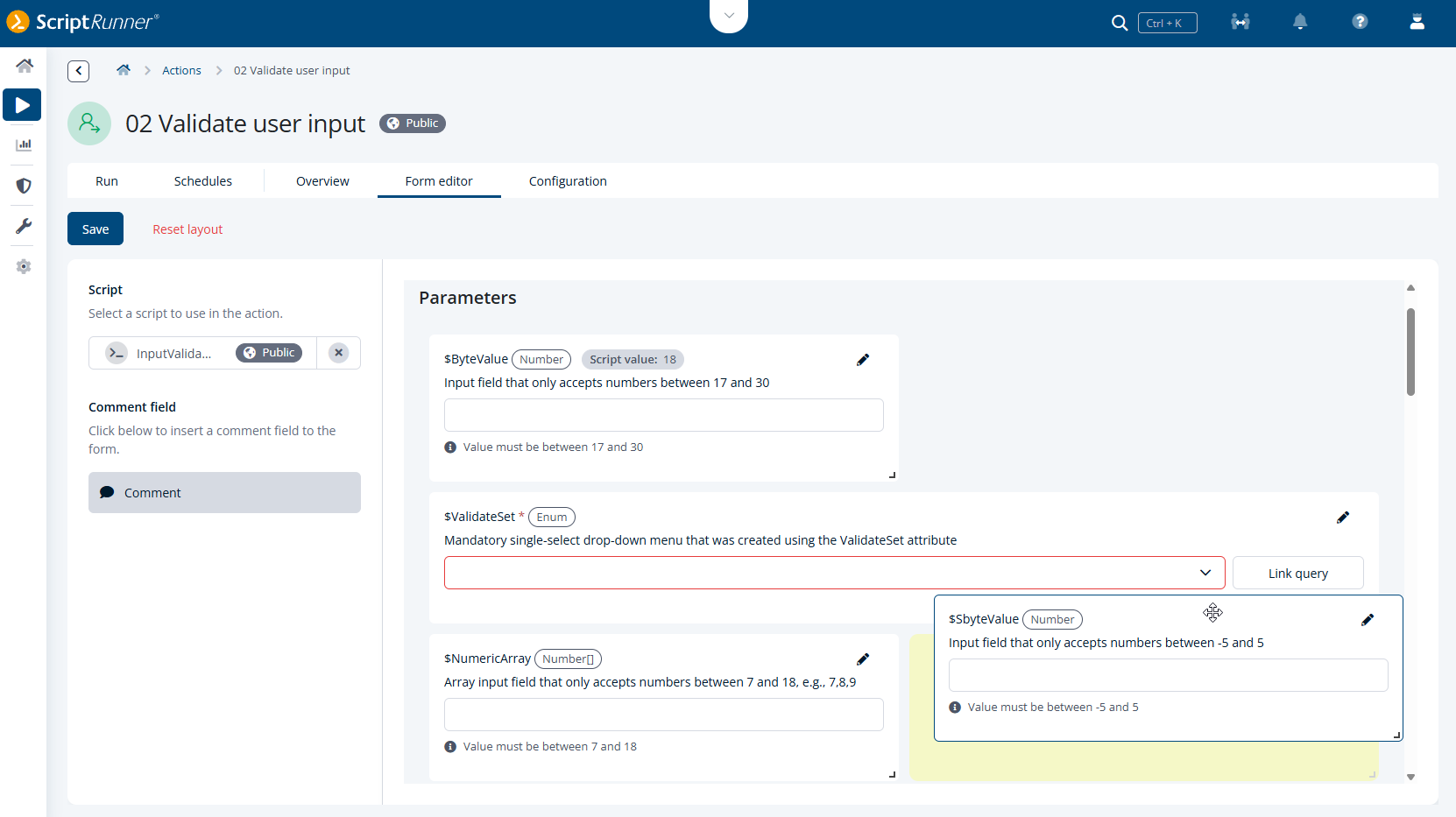
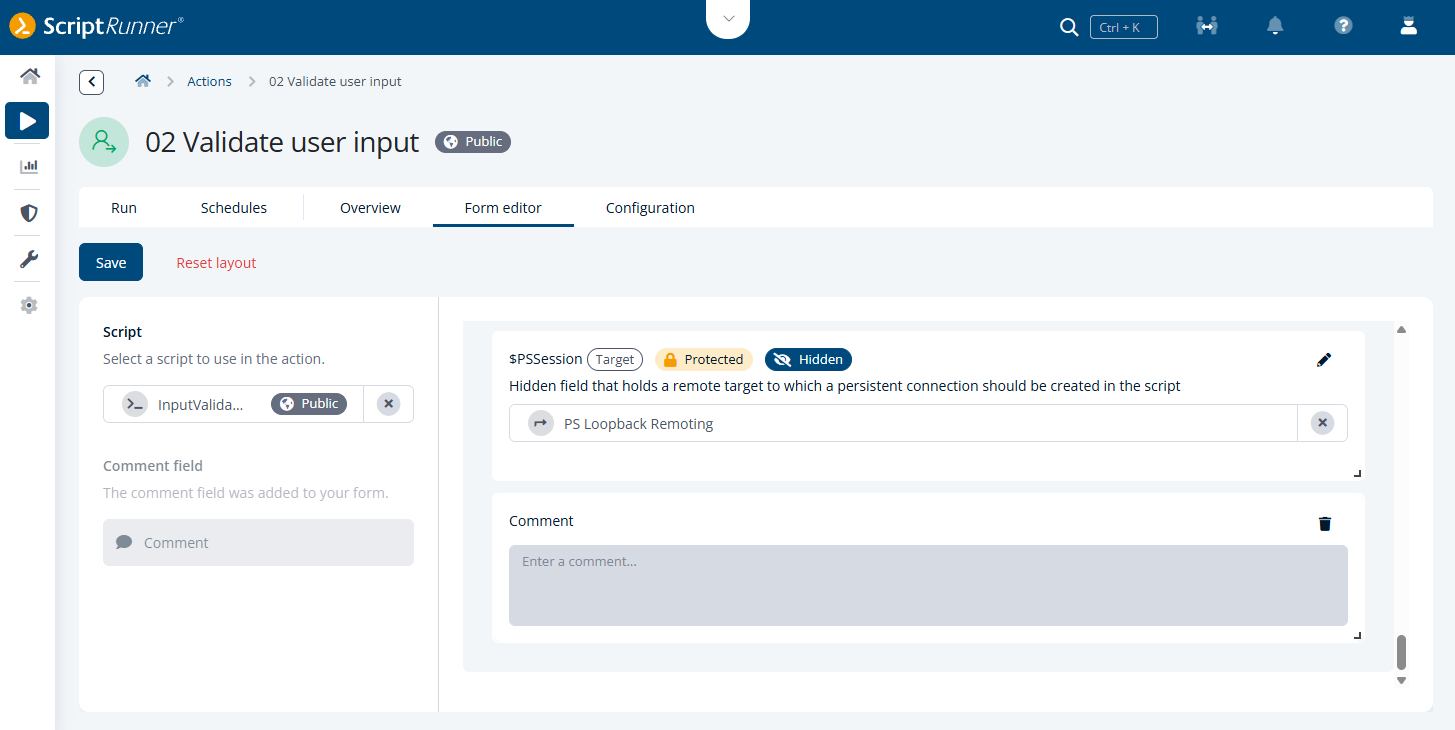
The new action form editor separates the visual design of action forms from the underlying PowerShell script. Fields can be freely arranged within a flexible layout, allowing you to tailor forms to your users and the underlying process.
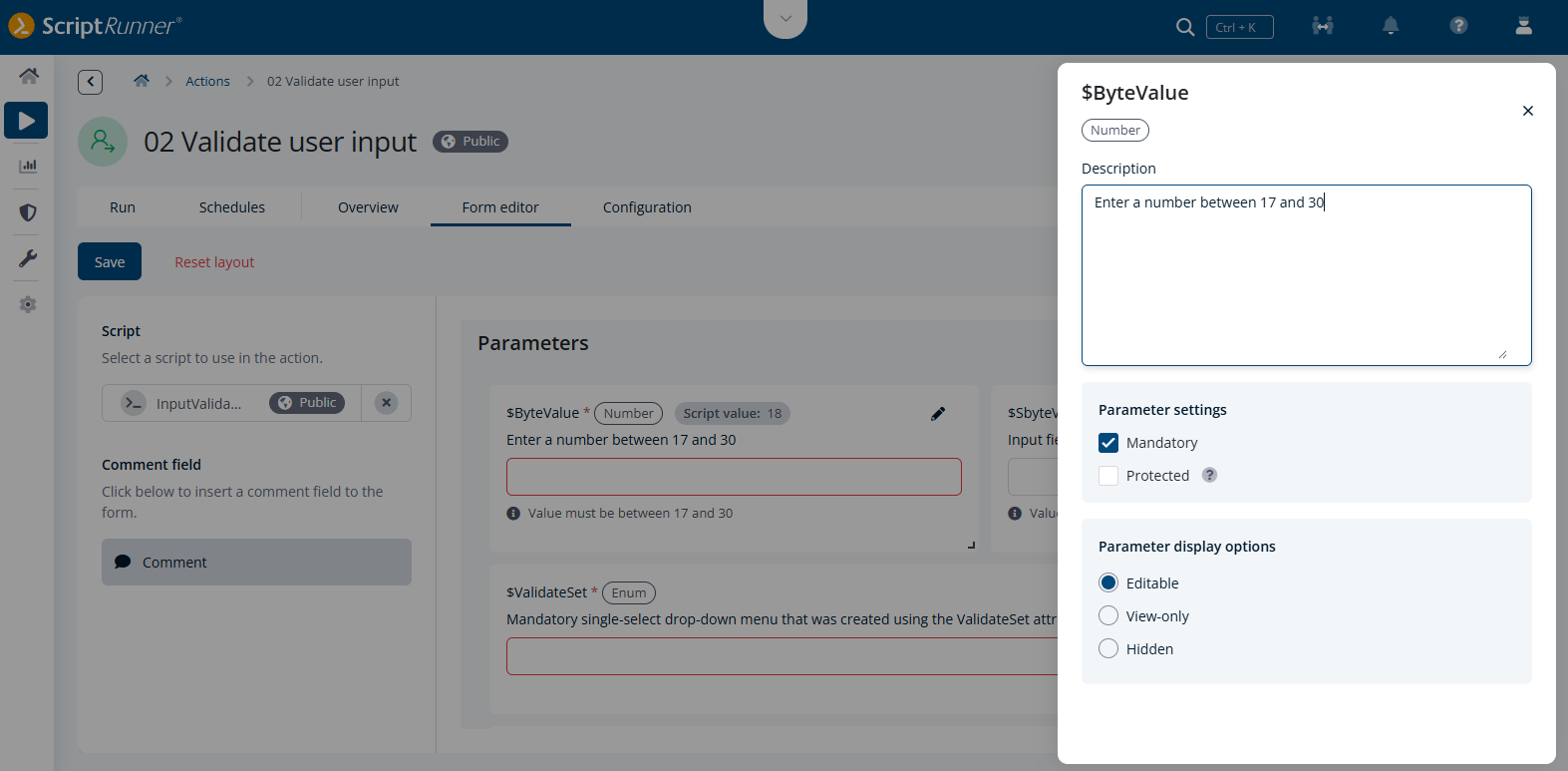
Additional parameter settings are available in a dedicated sidebar. Administrators can add multilingual descriptions, define mandatory or protected fields, control whether fields are editable, view-only, or hidden, and display PowerShell Boolean parameters as checkboxes. For fields with a linked query, the Custom query entries option can be enabled to allow values beyond those returned by the query.
Settings defined in the script remain the source of truth and cannot be modified in the form editor, except for parameter descriptions. This allows forms to be customized without changing the underlying script configuration.
The comment field can be placed freely within the form. Parameter sets are displayed as movable blocks, while the individual parameters within them retain their existing structure and cannot yet be configured independently.
Overall, the form editor provides greater flexibility in how action forms are structured and presented, without requiring changes to the underlying PowerShell script. Administrators can adapt forms more closely to their use case while keeping script-defined behavior intact.
Create personalized Live Monitor dashboards
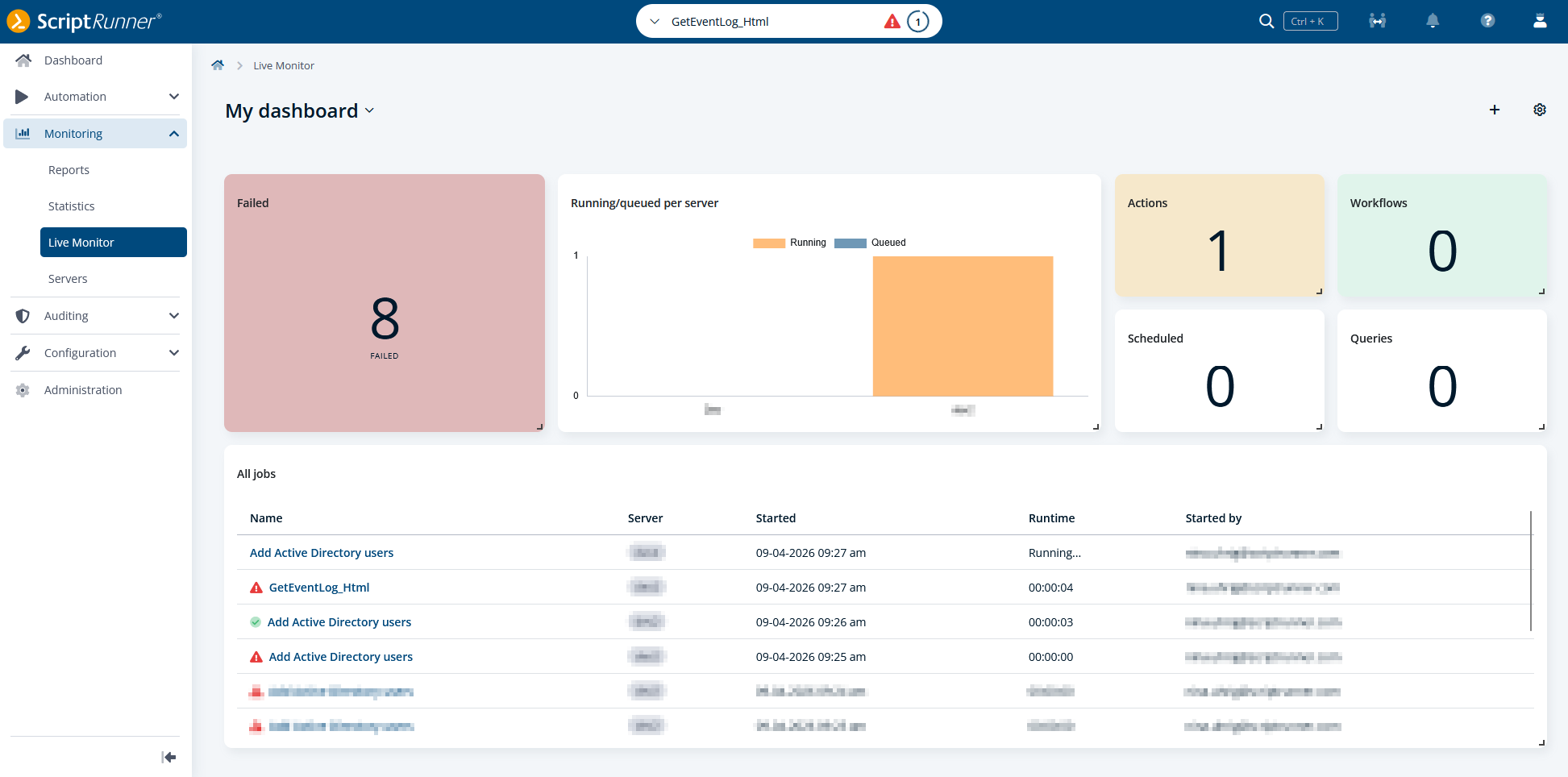
With ScriptRunner 8.2, the Live Monitor evolves from a fixed view into a configurable dashboard experience. Instead of relying on a predefined layout, administrators can now customize the Live Monitor to focus on the information most relevant to their daily operations.
Using configurable widgets, you can add monitoring components and arrange them according to your individual needs. The flexible layout allows you to create personalized views that provide faster access to operational insights while reducing the need to switch between different views.
This helps administrators focus on the information most relevant to their responsibilities, making it easier to monitor activity, spot potential issues, and gain a quick overview of their automation environment at a glance.
Preview: Automate ScriptRunner configuration with PowerShell
With version 8.2, we're introducing a preview ScriptRunnerCli, an upcoming PowerShell module for managing ScriptRunner configuration elements through cmdlets. Instead of relying on the UI or API, administrators can automate configuration tasks directly from PowerShell and incorporate them into existing automation processes. This initial version of ScriptRunnerCli is a preview and still in the experimental stage. Let us know what you think!
The initial release already supports a broad set of commonly used elements, including credentials, queries, and actions. This covers multiple credential and query types, as well as action settings for notifications, reporting, and execution behavior. The ScriptRunnerCli module also provides access to related elements such as scripts, workflows, access groups, node groups, and script sources.
The ScriptRunnerCli module lays the foundation for more advanced automation and configuration-as-code scenarios in future releases. We plan to continue expanding the module with additional element types and capabilities and welcome feedback from customers as we shape the next steps. As with any new interface, some refinements may be necessary while the module evolves, although we will keep breaking changes to a minimum wherever possible.
Note: The ScriptRunnerCli module is built for PowerShell 7 and is not available in Windows PowerShell.
Additional improvements
In addition to major enhancements, version 8.2 introduces several improvements that streamline everyday tasks.
Track changes across configuration objects
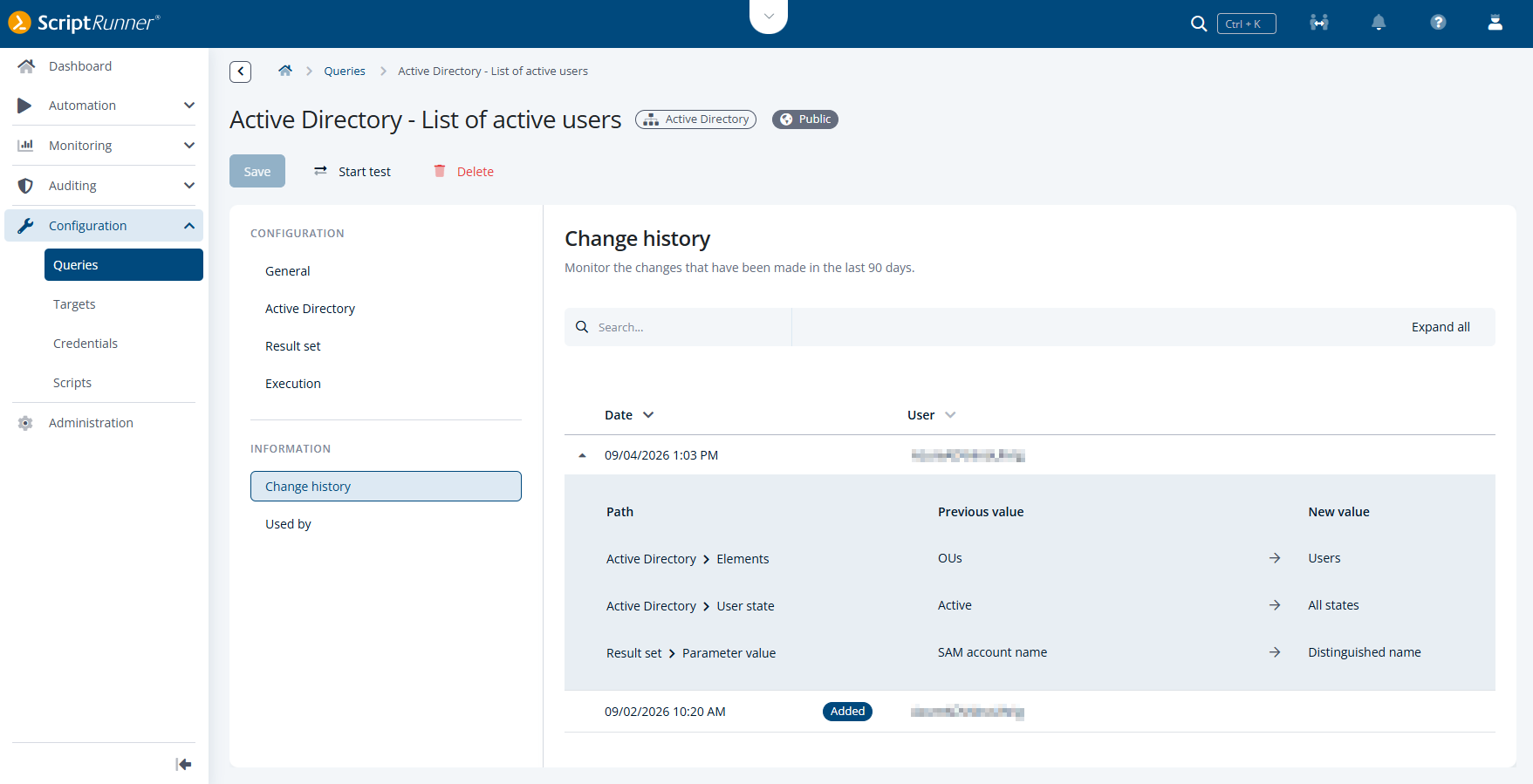
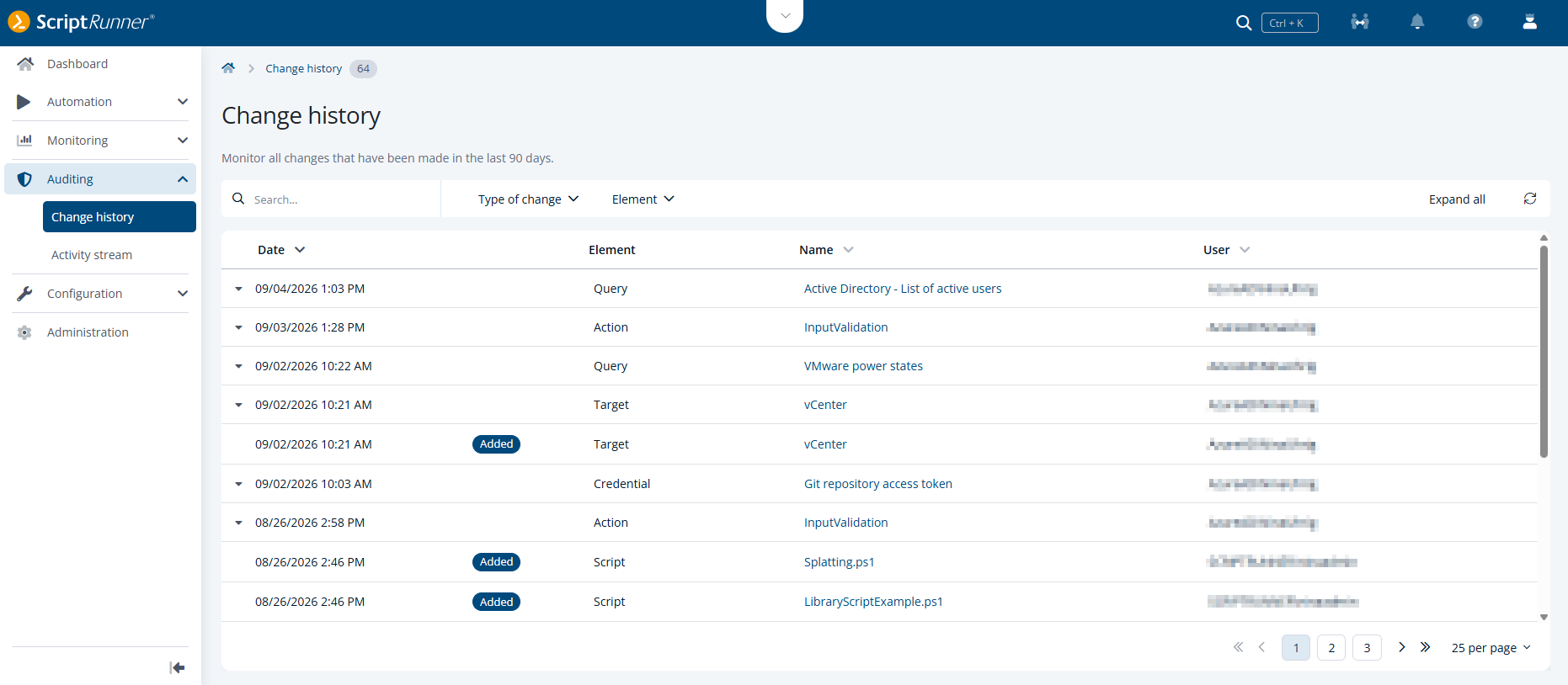
ScriptRunner 8.2 extends the existing change history concept to targets, credentials, scripts, and queries, providing greater transparency for configuration changes across the automation environment. Changes to these objects are now tracked consistently and are also available through the global Change history view in the new Auditing section.
For every change, ScriptRunner records who performed the modification, when it occurred, and whether the object was created, updated, or deleted. In addition, the change history provides visibility into the affected configuration values, allowing administrators to understand not only that a change occurred but also what was changed.
The enhanced change history supports more efficient troubleshooting by allowing administrators to correlate configuration changes with connection issues or unexpected system behavior. Recently modified objects can be identified quickly, helping to narrow down potential causes and reduce the effort required for root-cause analysis.
By applying a consistent change tracking approach across multiple object types, ScriptRunner improves operational transparency and establishes a foundation for future audit, compliance, and governance requirements.
Verify permissions from the perspective of your users
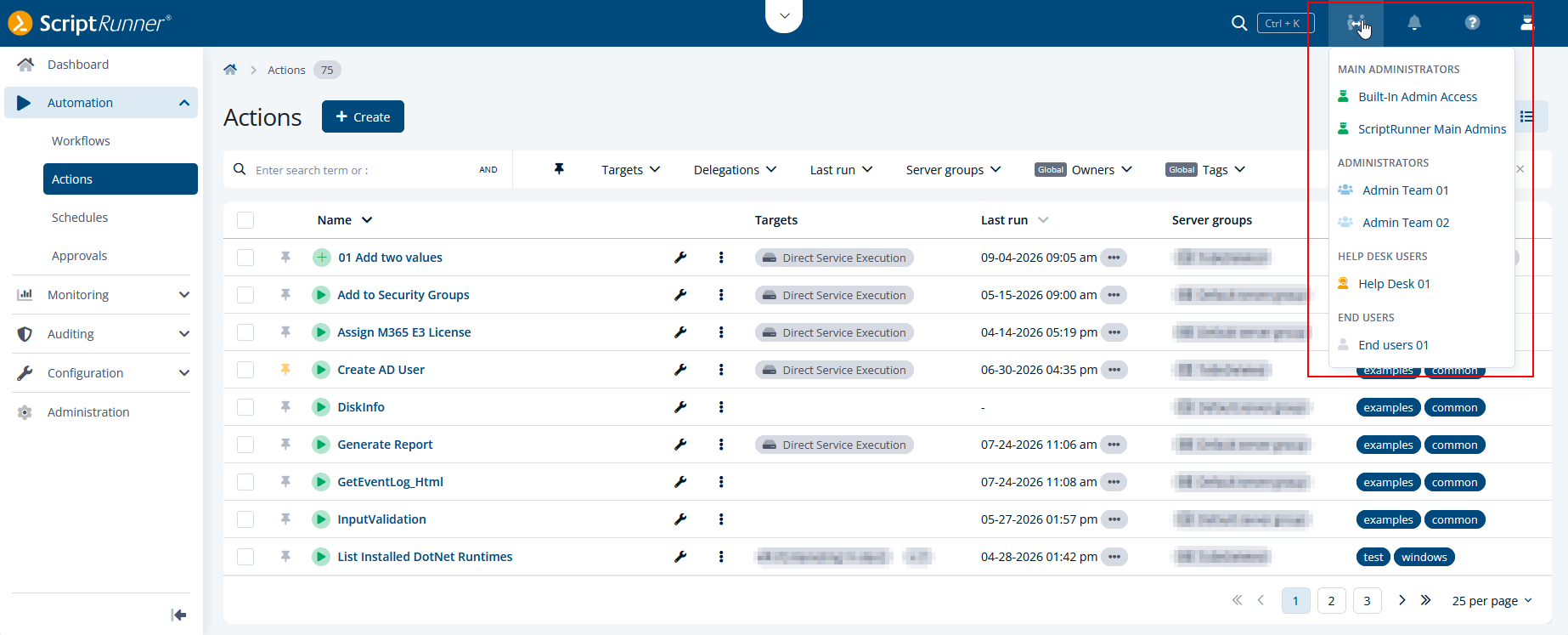
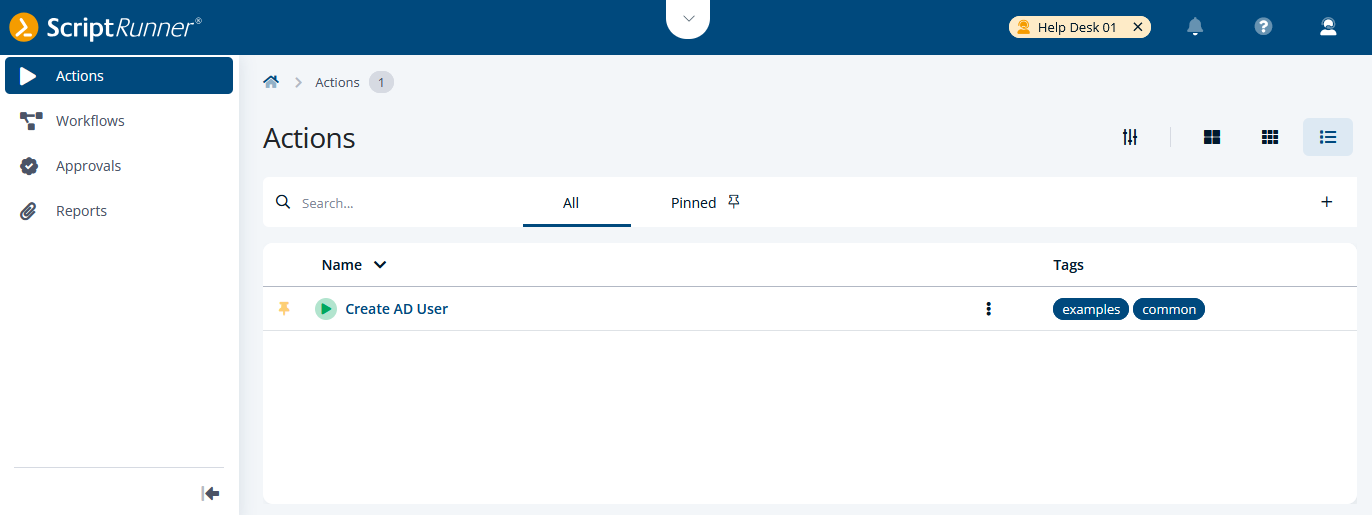
ScriptRunner 8.2 introduces access group impersonation for main administrators. Instead of signing in with test accounts or coordinating with users, main administrators can now switch directly to the perspective of an access group from within the Portal.
This allows you to instantly verify which actions, workflows, reports, and Portal features are visible to members of a specific access group. As a result, permission validation becomes faster, troubleshooting is simplified, and configuration issues can be identified before they affect users.
By providing a realistic view of the user experience, access group impersonation makes it easier to validate delegations, review access rights, and ensure that users see exactly the content intended for them.
Work with a cleaner and more consistent Portal header
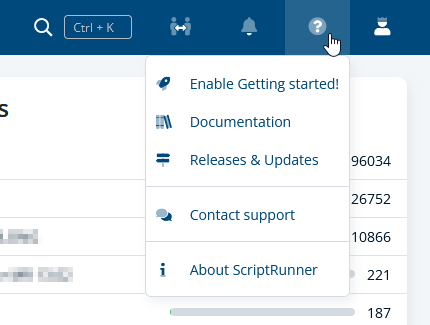
ScriptRunner 8.2 introduces a redesigned Portal header that provides a more consistent and streamlined user experience. As new features have been added over time, the header has grown organically, making it harder to navigate and locate frequently used functionality.
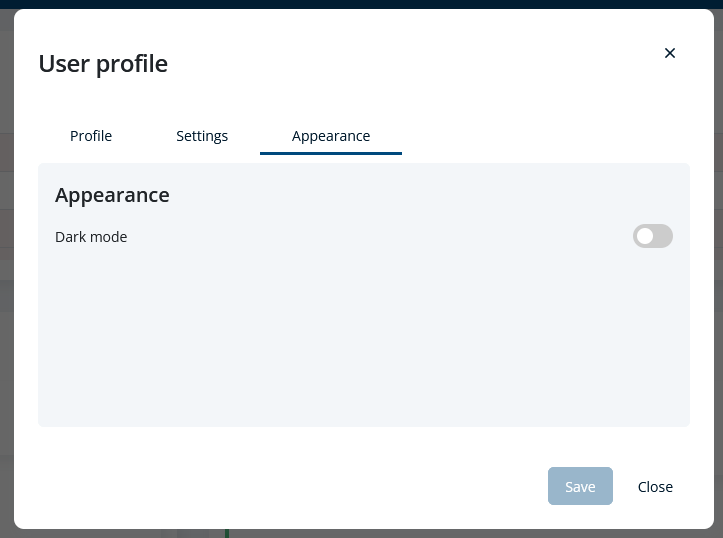
The updated design groups related functions more logically and consolidates controls to reduce visual clutter. Navigation elements have been reorganized to create a cleaner and more intuitive structure, helping users locate functionality more quickly. In addition, the dedicated rocket icon has been removed from the header. The associated Getting started! content remains available through the help menu, ensuring that onboarding resources remain easy to access. The light and dark mode switch has been moved to the user profile menu, bringing user-specific settings together in a single location. Further, to make it easier to stay informed about product changes, the help menu now also includes a direct link to ScriptRunner’s release notes, providing quick access to information about new features, improvements, and fixes.
The result is a cleaner and more consistent header structure that makes Portal navigation easier to understand and maintain as the product continues to evolve.

Keep your preferred Reports and Schedules view
The Reports and Schedules sections now remember your preferred view. Whether you work primarily with the list view or prefer the dashboard and calendar views, ScriptRunner saves your selection and automatically restores it the next time you open the module.
This creates a more consistent user experience and eliminates the need to switch views repeatedly. Administrators can immediately continue working in their preferred layout, making day-to-day tasks more efficient and reducing unnecessary clicks.
Work with more data in a single view
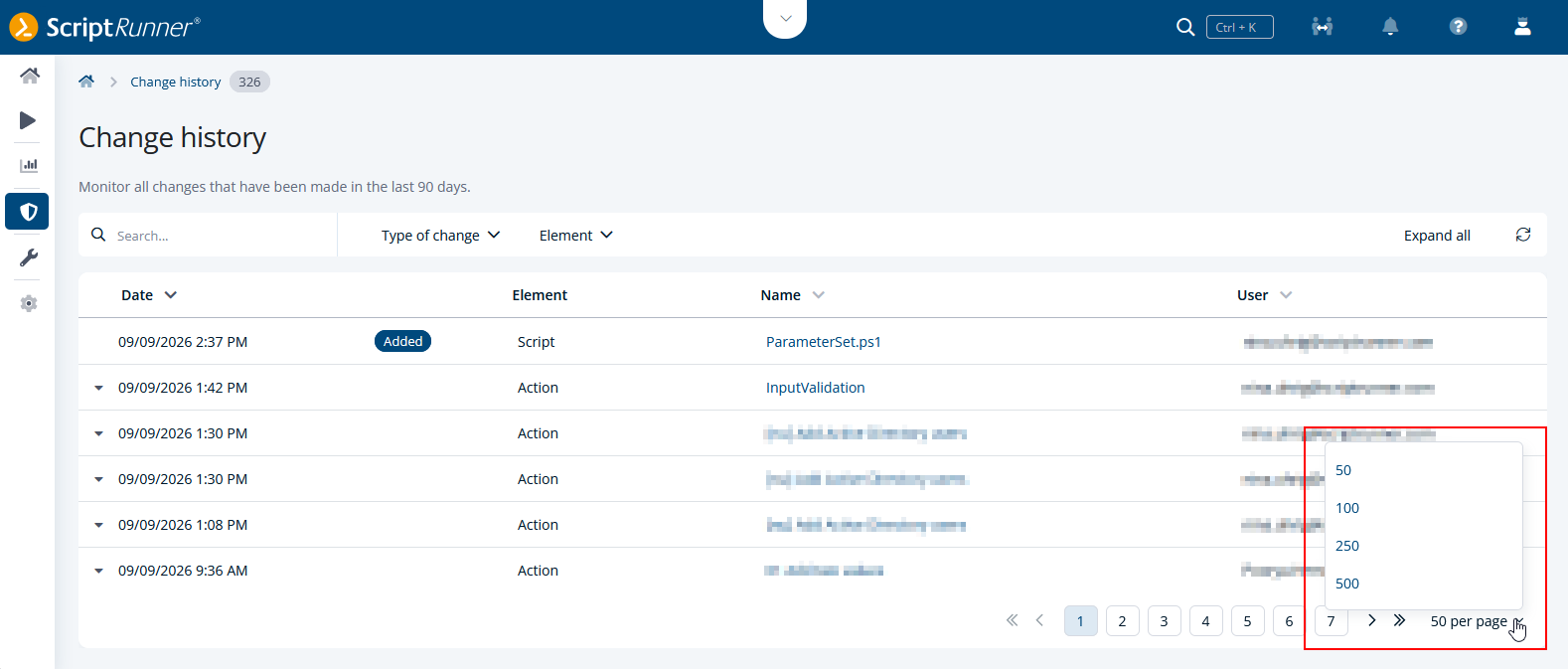
List views across ScriptRunner provide larger page size options, making it easier to work with extensive environments and large numbers of configuration elements. Instead of frequently navigating between pages, you can display up to 500 entries at once in supported tables.
For most list views, ScriptRunner now also remembers your selected page size to create a more consistent experience. Once you choose your preferred number of entries there, it is automatically applied whenever you return to that list view.
This reduces repetitive navigation, minimizes unnecessary clicks, and helps administrators review and manage large sets of data more efficiently.
ScriptRunner now runs on .NET 10
With version 8.2, we have upgraded ScriptRunner to .NET 10. This Long-Term Support (LTS) release from Microsoft provides the foundation for continued performance, security, and reliability improvements across the product.
For you, this means a more future-ready automation platform that benefits from the latest .NET enhancements without requiring any additional configuration.
For more information about the new features as well as how to upgrade to version 8.2, visit ScriptRunner's Online Documentation Portal.
