.svg)




One of the first operational problems that appears in larger ScriptRunner environments is the loss of execution control. Administrators know which actions should run in production, which belong to isolated maintenance systems, and which are only intended for testing — but the automation platform itself often has no awareness of these boundaries.
In smaller environments, this is usually manageable through conventions and administrator discipline. In enterprise infrastructures with multiple ScriptRunner servers, load balancers, delegated administration, and compliance requirements, those conventions stop being reliable. At that point, controlling where actions are allowed to execute becomes an operational requirement rather than a design preference.
This is exactly the problem Server Groups in ScriptRunner are designed to solve.
The Situation Without Server Groups
In many environments, ScriptRunner starts with a single server and a manageable number of actions. Over time, additional execution servers are introduced for scalability, regional administration, security segmentation, or high availability.
That growth creates a common issue: actions become executable from infrastructure nodes that were never intended to run them.
Typical examples include:
- Test automation accidentally executing on production-connected servers
- Security-sensitive scripts running on shared infrastructure
- Location-specific administrative tasks executing from the wrong datacenter
- Actions depending on service accounts that only exist on certain systems
- Operational confusion in load-balanced ScriptRunner deployments
Without explicit execution control, administrators usually compensate with workarounds. They maintain documentation about “allowed” servers, build environment checks directly into PowerShell scripts, or rely on administrators remembering which node belongs to which operational purpose.
The problem is that none of these approaches are enforceable.
Once multiple ScriptRunner servers exist, the execution layer itself must become policy-aware.
Why Traditional Workarounds Break Down
A common assumption is that infrastructure topology alone controls execution behavior. In reality, this is rarely true.
Load balancers only distribute frontend access. They do not define where actions are operationally allowed to execute. Likewise, naming conventions such as “SR-PROD-01” or “SR-TEST-01” are helpful for administrators, but they provide no technical enforcement inside the automation platform.
This becomes risky in environments with governance or compliance requirements.
For example, a privileged Active Directory maintenance action may only be permitted on hardened administration servers with restricted network access. A test automation workflow may require isolated execution hosts to avoid unintended interaction with production systems. In distributed environments, location-specific automation may need to remain within regional infrastructure boundaries.
Without centralized execution control, those requirements become fragile operational processes rather than enforceable platform rules.
How Server Groups Work in ScriptRunner
Server Groups introduce execution scoping directly into ScriptRunner.
A Server Group defines which ScriptRunner servers are responsible for executing assigned actions. Instead of allowing actions to run across the entire infrastructure, administrators explicitly associate actions with designated execution groups.
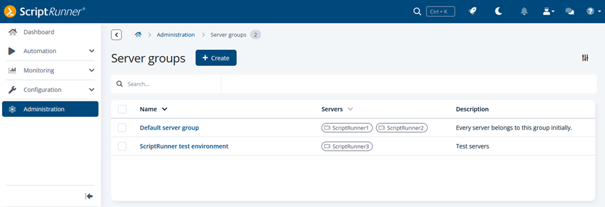
ScriptRunner always contains at least one Server Group: the Default Server Group.
Initially:
- All servers belong to the Default Server Group
- All actions are assigned to the Default Server Group
From there, administrators can create additional groups for operational separation.
One important architectural detail is that actions and servers behave differently inside this model.
A server may belong to multiple Server Groups simultaneously. This allows shared execution infrastructure where appropriate. Actions, however, are always assigned to exactly one Server Group at a time. This creates a clear and predictable execution responsibility.
When an action is assigned to a newly created Server Group, ScriptRunner automatically removes it from the Default Server Group. If the action is later removed from that group again, it is reassigned automatically back to the Default Server Group.
This prevents actions from becoming orphaned unintentionally while still enforcing a single execution scope.
Practical Use Cases for Server Groups
The most common use case is production and test separation.
Organizations often create dedicated Server Groups for test instances so that new or modified automation processes can be validated safely before production rollout. This avoids accidental execution against live infrastructure while still using the same centralized ScriptRunner platform.
Another practical scenario involves security isolation.
Certain automation processes may require hardened servers with restricted connectivity, dedicated service accounts, or elevated administrative privileges. Assigning these actions to isolated Server Groups ensures they cannot execute on general-purpose automation nodes.
Server Groups are also useful for regional or infrastructure-specific automation.
For example:
- Actions intended for European infrastructure can execute only on European management servers
- Datacenter-specific maintenance actions can remain local to the target environment
- Actions requiring special firewall access can be restricted to dedicated execution systems
This becomes particularly valuable in enterprises where network segmentation or compliance policies restrict administrative execution paths.
Reliability Considerations in Multi-Server Environments
One operational aspect that deserves special attention is availability design.
ScriptRunner technically allows Server Groups that contain actions but no servers. In such situations, administrators receive an execution error because no eligible execution target exists.
While this behavior is intentional and operationally transparent, it highlights an important design principle: critical Server Groups should never depend on a single server.
In multi-server environments, any Server Group responsible for business-critical automation should contain at least two identically configured servers. This ensures that actions remain executable during maintenance windows, infrastructure failures, or operating system patching.
This requirement is easy to underestimate until the first unavailable execution node blocks scheduled production automation.
The operational maturity of Server Groups is not just about segmentation. It is also about predictable resiliency.
Conclusion
Server Groups provide one of the most important governance mechanisms in larger ScriptRunner environments: controlled execution placement.
Instead of relying on documentation, administrator knowledge, or infrastructure naming conventions, execution boundaries become part of the automation platform itself. Actions execute only on explicitly assigned servers, making automation behavior predictable and enforceable.
This improves several operational areas simultaneously:
- Separation between production and test automation
- Security isolation for privileged processes
- Compliance and auditability
- Infrastructure-specific execution control
- Reliability in distributed ScriptRunner environments
Most importantly, Server Groups decouple automation governance from individual administrators and server-specific scripting practices. Execution control becomes centralized, maintainable, and transparent — which is exactly what enterprise automation environments eventually require.
Ready to bring more control, security, and predictability to your automation environment?
Book a personal demo with our automation experts to see how ScriptRunner helps you enforce execution policies at scale.