.svg)


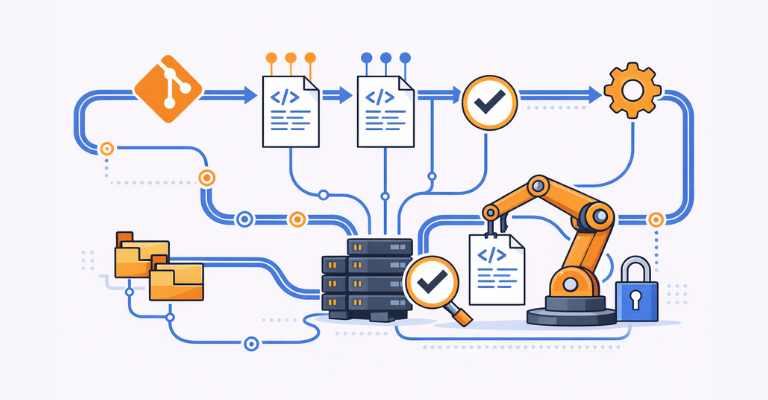

Automation scripts are production code. They create users, modify Active Directory, configure infrastructure, and touch systems across the entire environment. Most teams understand that scripts should be version-controlled, and many already use Git. But having scripts in a Git repository does not automatically mean your automation is governed. ScriptRunner’s Git integration closes the gap between versioned code and governed execution, giving you change history, rollback, and compliance without requiring every administrator to become a Git expert.
The Problem with Unversioned Automation Scripts
In many IT environments, PowerShell scripts accumulate over time. They start as quick fixes and gradually become critical components of daily operations. But while the applications those scripts manage are carefully version-controlled and deployed through pipelines, the scripts themselves are often treated as informal artifacts.
Scripts are saved to shared folders, emailed between team members, or edited directly on the server where they run. File names carry version hints like cleanup_v3_final_FINAL.ps1, but nobody is entirely sure which version is actually in production. When a script breaks after a change, the previous working version may already be overwritten.
This is a governance gap that grows silently until it becomes an operational problem. Tribal knowledge fills in the blanks: one senior admin knows which version runs where, how it was changed last quarter, and why a particular parameter was set the way it is. When that person leaves the team or goes on vacation, that knowledge walks out with them.
Why Git Alone Does Not Solve It
The obvious answer is to put scripts into a Git repository, and many teams do exactly that. Git gives you version history, branching, and collaboration on the code itself. But Git only solves half the problem.
Git does not control who can run a script, what credentials it uses, which targets it executes against, or whether the version in the repository is actually the version that ran in production last night. A team can have perfectly versioned scripts in Git and still face the same governance gaps: no central execution control, no audit trail linking a specific script version to a specific execution result, and no way to roll back a running automation to a previous version without manually copying files to a server.
There is also a practical barrier. Not every systems administrator is comfortable with Git. Expecting operations teams to work fluently with command-line Git, resolve merge conflicts, and manage branching strategies adds friction that often leads to workarounds: scripts get edited locally and never committed, or the repository falls out of sync with what actually runs.
How ScriptRunner Bridges Git and Automation Governance
ScriptRunner connects directly to Git repositories, supporting cloud-hosted services like GitHub, GitLab, and Azure DevOps, as well as self-hosted Git servers. In the Script Sources configuration, you add your Git repository alongside or in place of the local script library, and ScriptRunner synchronizes scripts from the repository into its environment.
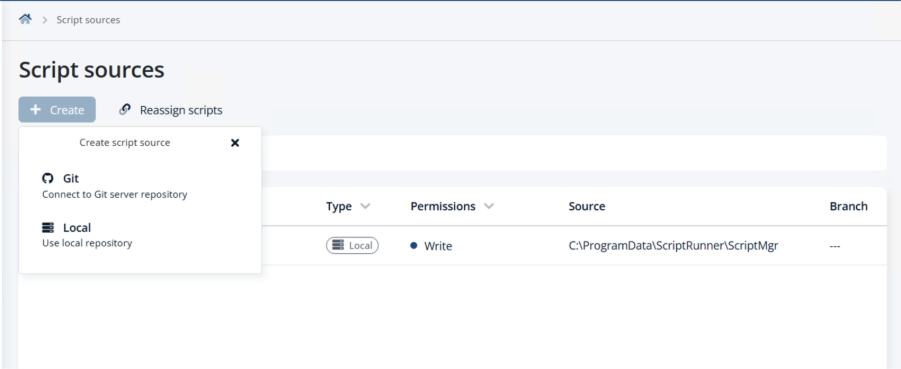
From that point on, ScriptRunner becomes the execution and governance layer on top of Git. Scripts are versioned in the repository, but execution, credentials, targeting, monitoring, and audit are all handled by ScriptRunner. This is the critical difference: Git manages the code, ScriptRunner manages everything that happens when the code runs.
Built-In Change History Without the Command Line
One of the most practical benefits of ScriptRunner’s Git integration is that administrators do not need to use Git commands to see what changed. ScriptRunner surfaces the full commit history directly in its interface. For each script, you can see every commit: who made the change, when it was made, and what the commit message says.
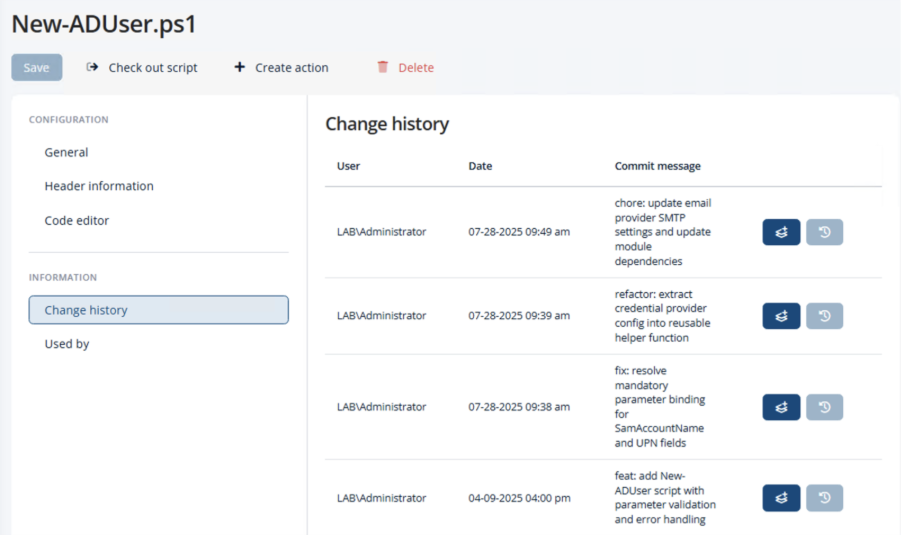
This means the people who need visibility into script changes most—operations leads, security reviewers, compliance officers—can get it without opening a terminal or navigating a Git web interface. The information is right where the scripts are managed.
Rollback, Branching, and Collaboration Without Tribal Knowledge
With ScriptRunner’s change history, rollback is not a manual recovery exercise. If a script change introduces a problem, you can revert to any previous version directly from the ScriptRunner interface with a single click. There is no need to check out a previous commit, copy files, or coordinate with whoever made the original change. The working version is restored immediately and ready to execute.
For teams that use branching workflows, developers and advanced administrators can continue to work in their preferred editors and IDEs, commit changes, create pull requests, and follow code review practices. ScriptRunner picks up the changes once they reach the configured branch, ensuring that what runs in production always matches what has been reviewed and approved in the repository.
This combination eliminates the tribal knowledge problem. The full history of every script lives in one place and is visible to the entire team. When an administrator leaves, their work is fully documented and recoverable. When a new team member joins, they can see exactly how each script evolved and why.
Governance and Audit: From Script Change to Execution Result
Git provides a record of every change made to every script. ScriptRunner provides a record of every execution: who triggered it, which version of the script ran, what parameters were used, and what the result was. Together, they create end-to-end traceability that neither tool can deliver on its own.
When an auditor asks what version of a script ran against production last Tuesday and who approved the most recent change, the answer is a few clicks away. This is the governance layer that Git alone cannot provide, and it is exactly what compliance, security, and operations teams need to trust their automation.
Key Takeaways
- Git versions your scripts, but ScriptRunner governs their execution—together they close the full automation governance gap
- ScriptRunner surfaces Git commit history in its own interface, no command-line Git knowledge required
- One-click rollback to any previous script version directly from the ScriptRunner UI
- Script sources can be configured as Git repositories alongside or replacing local libraries
- End-to-end audit trail from script change through execution result, ready for compliance reporting
- Tribal knowledge is replaced by visible, documented change history accessible to the whole team
- Branching and pull request workflows are supported for teams that want code review on automation scripts
Bottom Line
Putting automation scripts into Git is a good start, but it only versions the code. It does not govern who runs it, what credentials it uses, or whether the right version actually executed. ScriptRunner’s Git integration bridges that gap: scripts are versioned in Git, while execution, rollback, credentials, and audit are managed centrally in ScriptRunner. Administrators get a visual change history and one-click rollback without needing to master Git. Compliance teams get an end-to-end audit trail. And the organization replaces tribal knowledge with a single, governed source of truth for every automation script.
To see how Git-backed automation governance works in practice, book a meeting with us.