.svg)
Boundless Automation
The seamless integration of ScriptRunner into your infrastructure opens your path to fully automated IT. With ScriptRunner, you move forward safely and quickly. You decide, where the journey should go to.
Integrate everything important

Identity management – first milestone for many customers:
Central identity management is the key to secure authentication, rights and roles. Connect ScriptRunner with your IDM, that's it.
Use strong vaults for the secrets:
The safekeeping of secrets in vaults is a key security feature. You can choose between different vaults and password management systems.
Messaging through the preferred channel:
Receive notifications about any exceptions or inconsistencies in your automated processes via email, Teams, Engage, Slack or directly in the integrated application – which way do you choose?

Your road to end-to-end automation
ITSM, workflow automation, monitoring, business apps, deployments:
All these systems in your IT landscape use ScriptRunner as a reliable automation engine. This gives you a central overview of all automation processes.
Backend and frontend integration:
No matter which options you use – via interface, widget or application – the automated tasks are always executed. Your users will be happy.
Different API modes and authentication options:
Systems are integrated via our automation interfaces, which support different modes of operation and various authentication methods.
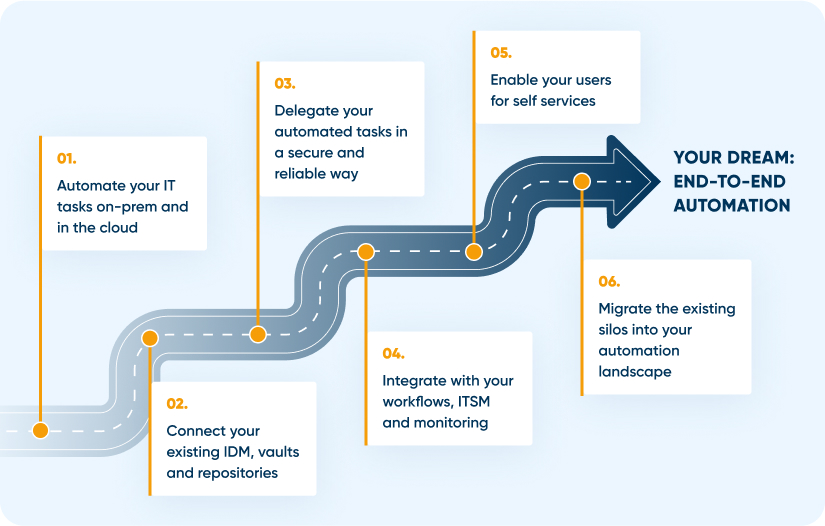
Automate your IT landscape completely
Cloud applications and services:
Diversity in IT is a challenge. With ScriptRunner, you'll master it. Whether there's M365, Azure, AWS and Google or IaaS, PaaS and SaaS to manage, it just works.
On-premises systems and devices:
IT infrastructure isn't just cloud. It's just as necessary to run internal systems, services and applications as well as devices. You can always count on ScriptRunner for that.
Access guaranteed:
ScriptRunner provides many different connectivity options. So you can manage systems even in tricky constellations.





