.svg)


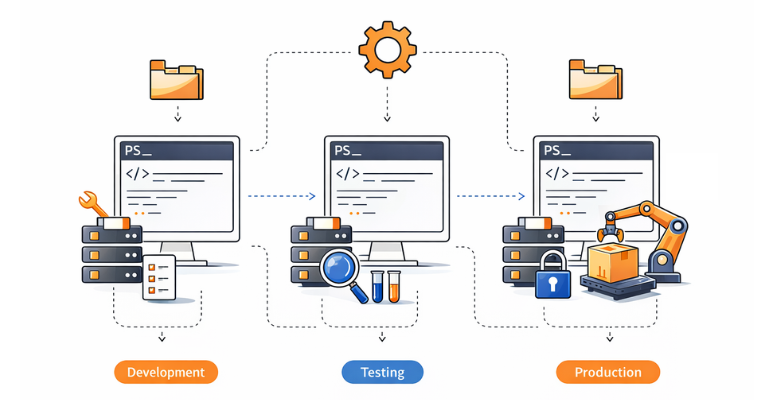

In modern software projects, a clearly structured development and deployment process plays a crucial role. A central element of this process is staging, which means working with different environments such as Development, Testing, and Production. This separation makes it possible to develop, test, and roll out new features in a controlled manner without jeopardizing the stability of productive systems.
Staging is becoming increasingly important, especially in the area of PowerShell development. PowerShell scripts are frequently used for automation, deployment, configuration management, and infrastructure processes: areas in which errors can quickly have wide-ranging consequences.
By using clearly defined staging environments, scripts can be tested safely, dependencies can be simulated, and rollouts can be made reproducible. As part of an enterprise PowerShell automation strategy, staging facilitates collaboration within teams, as changes can be reviewed transparently and tested in isolation before going live.
Staging therefore forms the foundation for reliable, scalable, and professionally managed PowerShell solutions, which is an essential component of modern DevOps and automation strategies.
Use of Git
When Git is used as a version control system, staging plays a central role in the development process. Git deliberately separates three areas: the working directory, the staging area, and the repository. This structure makes it possible to prepare, group, and then permanently version changes in a controlled way.
Especially in PowerShell projects, where automation logic, configuration files, and infrastructure scripts are often closely intertwined, staging offers decisive advantages:
- Selective versioning: Only reviewed or completed changes are included in a commit.
- Clean commit history: Changes can be grouped logically, making later analysis and rollbacks easier.
- Secure deployment pipelines: In DevOps environments, only staged and committed changes can be automatically tested or rolled out to staging and production environments.
- Team transparency: Clearly defined staging steps make it traceable who prepared and approved which PowerShell changes.
Staging in Git thus forms the basis for a structured, reproducible, and secure development process: an essential building block for professionally managing PowerShell scripts and reliably deploying them across different environments.
Staging Workflow
Working in a team requires at least three stages (branches):
Production, Testing, and Development.
Production
The production branch represents the stable and approved state of all scripts. No development or adjustment work is permitted in this branch. The goal is to protect the productive environment and ensure continuous, error-free operation.
The Help Desk works exclusively with this tested and approved version of the scripts. New features or changes are only merged into the production branch after successful testing and formal approval.
Testing
The testing branch is used for quality assurance and is made available to a broader group of users. Developers can update this branch at any time and adapt it to new test results.
All changes are reviewed, evaluated, and revised if necessary in this environment. Only once all testers have confirmed the functionality may the verified changes be transferred to the production branch.
Development
When starting a new development, for example, implementing a use case or modeling a business process, a dedicated development branch is created. To do this, the developer first updates the current production branch and then branches off their development branch from it.
As soon as a functional intermediate state is reached that can be tested, the development branch is merged into the testing branch. If errors occur during testing or the development goal has not yet been fully achieved, the developer continues working in their branch. After the necessary adjustments, the updated state is provided again for testing in the testing branch.
Only after all testers have confirmed the functionality is the development branch merged into the production branch and then deleted.
Conclusion
Working with clearly defined stages significantly increases the security and stability of the production environment. Additional stages allow code changes to be reviewed in a targeted manner or approvals to be restricted to a specific group of people who, for example, manage their own maintenance windows for merging into production. Such stages and permission models can also be fully implemented in Git.
Despite these technical possibilities, coordination within the team remains essential. It helps avoid merge conflicts and minimizes parallel work on the same scripts. A structured and aligned workflow therefore forms the foundation for efficient and reliable development work.
Bring staging discipline to your PowerShell automation with ScriptRunner. Book a meeting with our team.