.svg)




Queries in ScriptRunner replace free-text parameters with live dropdowns, and their built-in search means even a long list is quick to navigate: type a few letters and jump straight to the entry.
So why would you need anything more? Because search only helps you find faster; it does not change what can be found. It still looks across the entire result set, and it cannot help at all when one parameter only makes sense in the context of another – a Teams channel, for example, only exists within a team. Cascading queries solve both: dropdowns that depend on each other, where every choice narrows what the next one offers.
The Problem: Search Finds Fast, but It Finds Everything
Imagine a delegated Action that runs a maintenance script against a single machine – restart a service, clear a cache, apply a fix. A standard query fills the computer parameter with every server in the environment, and the operator types a name into the search to find it.
That is fast, but the search runs across the whole estate. Type “SQL” and you get every SQL server you own, and in most naming schemes SRV-SQL-PROD-01 sits one line away from SRV-SQL-TEST-01. Pick the wrong one and the mistake is not hypothetical; it is a restarted service on a production database in the middle of the day.
There is also a scoping problem. A searchable flat list still exposes the entire estate to everyone who can run the Action. The operator responsible for the test environment can find and select production machines their task has nothing to do with. That is more visibility than the task requires, and exactly the kind of over-exposure that makes governance and audit conversations uncomfortable.
And some parameters cannot be solved by search at all, because their valid values depend on an earlier choice. Which Teams channels should a dropdown offer before you know the team? Which snapshots, before you know the virtual machine? A flat list of every channel or snapshot in the company is not just unwieldy: it is the wrong list.
What Cascading Queries Are
A cascading query is a query whose result depends on the value of another parameter in the same Action. Instead of returning a fixed result set, it takes the operator's earlier selection as its input and builds its dropdown from that.
The lead example: the first parameter is Server Group, filled by a simple query listing your groups – test SQL servers, production web servers, branch office machines. The second parameter is Computer, filled by a cascading query that receives the selected group as its argument and returns only the machines belonging to it. Pick the test SQL group, and the dropdown contains exactly those servers: production is not one mis-click away, it is not in the list at all. The same pattern covers the structural cases (a team's channels, a VM's snapshots), and chains can go deeper, with a third dropdown depending on the second.
How to Set It Up
Configuration happens in two places. First, in the Queries section, you create the query and set its execution mode to Cascading. This tells ScriptRunner that the query expects an input value at runtime instead of producing a static result set.
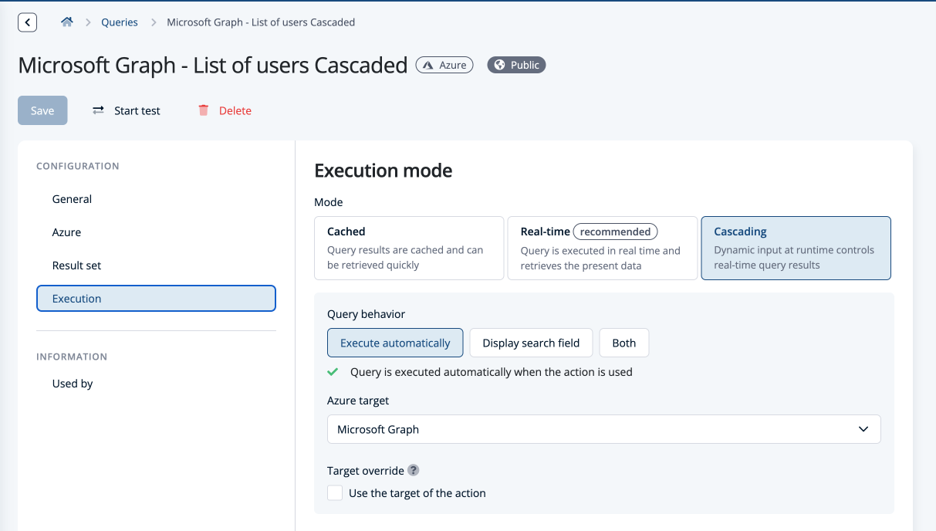
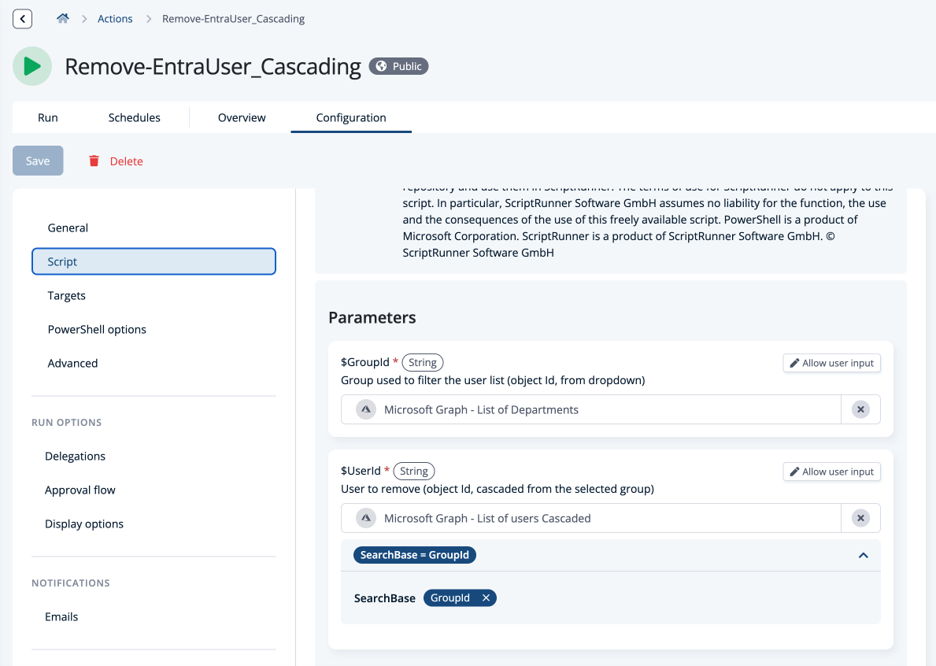
Second, in the Action's parameter settings, you wire the pieces together: you assign the cascading query to the parameter it should fill, and you choose which other parameter of the Action is passed to it as the argument.
In the example above, the Computer parameter gets the cascading query, with the Server Group parameter selected as its input. From that point on, the form behaves dynamically - as soon as the operator picks a group, ScriptRunner runs the query with that value and populates the machine dropdown with the filtered results.
Why This Matters
Fewer wrong picks, smaller scope. Search still returns every match in the estate; a cascading dropdown contains only the machines in the chosen group. Look-alike names and production systems are removed before the operator ever sees them – a governance win built into the form itself.
Dropdowns for dependent data. Channels of a team, snapshots of a VM, members of a group - values that only exist relative to an earlier choice get a correct, live dropdown instead of a flat list that was never quite right.
Delegation without training. The form guides the operator through the selection in the right order. Nobody needs to know naming schemes or where things live in the directory. The knowledge sits in the query, not in the person.
Beyond Cascading
Cascading is one execution mode within ScriptRunner's wider query system – Active Directory, Azure, VMware, list, file, and fully scripted queries all follow the same idea of turning parameters into safe selections.
For the full tour, see Master ScriptRunner Queries: Smarter Parameters for Every Action. If you want to cascade across cloud data – departments and users from Microsoft Entra ID, for example – the connection comes from a configured Microsoft 365 & Azure target, covered in the Microsoft 365 & Azure Targets article.
And for Actions where the right person selecting is not enough and the right person approving is also needed, cascading pairs well with the gates described in Built-In Approval Workflows.
Key Takeaways
• A cascading query takes another parameter's selected value as its input and builds its dropdown from it – server group first, then only that group's machines
• Query search finds entries fast, but it searches everything; cascading limits what can be selected at all, and handles values that only exist relative to an earlier choice, like a team's channels
• Setup is two steps: set the query's execution mode to Cascading, then in the Action's parameter settings choose which parameter is passed as the argument – and declare the upstream parameters as required
• Operators pick from a scoped shortlist instead of the entire estate, cutting wrong-target mistakes and over-exposure
Bottom Line
The difference between a usable delegated Action and a risky one is often just the input form. Query search makes big lists fast to navigate, cascading queries make them right.
Each choice narrows the next, operators only ever see what their task concerns, dependent values like channels and snapshots get proper dropdowns of their own, and the production server never appears in a dropdown meant for test.
It is a small configuration - one execution mode, one argument mapping - with an outsized effect on both safety and everyday usability.
To see how cascading queries can make your delegated automation safer and simpler, book a meeting with us.