.svg)



If you’ve been running ScriptRunner in production for a while, you’ve probably already centralized your scripts and execution logic. However, credentials might still be your weak spot: passwords stored in Windows credential store, service accounts with long-lived secrets, or worse, legacy scripts that still expect usernames and passwords to be maintained manually.
In regulated environments, this quickly turns into an audit discussion nobody enjoys. Azure Key Vault (AKV) closes that gap by moving secrets into a native Azure service while ScriptRunner handles execution, governance, and access control.
Azure Key Vault in a Nutshell
Azure Key Vault is Microsoft’s managed service for securely storing and accessing secrets, keys, and certificates. It’s designed to integrate natively with Azure identities, supports fine-grained access control, and provides built in logging and auditing through Azure Monitor. From a cost perspective, it’s also very attractive: you pay per stored secret and per access operation, without having to run or maintain any infrastructure yourself.
From a governance point of view, AKV checks many boxes at once: centralized secret storage, role-based access, audit trails, and alignment with Microsoft security best practices. ScriptRunner’s integration allows you to use Azure Key Vault as an external credential source instead of keeping sensitive data inside the automation platform itself.
The Situation Without ScriptRunner and Azure Key Vault
In many environments, credentials are scattered across different places. Some live in PowerShell scripts as secure strings, some are stored in Task Scheduler jobs, others are maintained manually by a handful of senior admins who “know where the secrets are”. Even when ScriptRunner is already in use, credentials are often managed internally and duplicated across environments.
This creates several persistent problems:
- There is no single policy driven control over how secrets are handled.
- Rotating credentials becomes risky and time consuming.
- Auditors ask where service account passwords are stored and who can access them, and the answers are usually more complicated than they should be.
- Knowledge about which script uses which credential is often implicit, not documented.
Why Common Workarounds Break Down at Scale
Standalone PowerShell credential files, encrypted strings, or manual documentation work reasonably well for a handful of scripts. At scale, they don’t. There is no consistent lifecycle for credentials, no reliable reporting, and no clean separation between automation logic and secret management. When administrators leave, credentials often need to be reset simply because nobody is sure where they are used.
Even with centralized automation, keeping credentials inside the automation tool means you still need to manage access, rotation, and compliance internally. This is where using a dedicated secret management service makes a real difference.
How ScriptRunner Technically Uses Azure Key Vault
ScriptRunner integrates with Azure Key Vault as an external credential provider. At a high level, ScriptRunner doesn’t store the secret itself. Instead, it retrieves secrets from AKV at runtime when a script is executed.
The integration is configured in ScriptRunner Server by defining a connection to an Azure Key Vault. Authentication is handled using Azure native mechanisms via an Azure App Registration. Access is granted explicitly to the Key Vault and limited to the required secret operations.
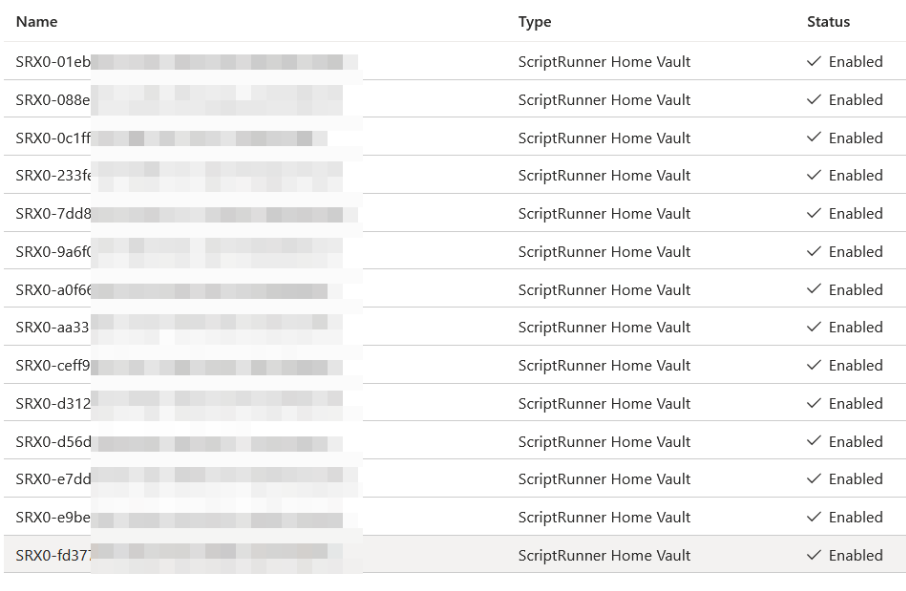
Within ScriptRunner, credentials are defined as references to Key Vault secrets. Scripts continue to use ScriptRunner’s credential handling mechanisms, but the actual secret value is fetched securely from AKV when needed. This keeps scripts clean and avoids hard dependencies on Azure APIs inside your PowerShell code.
Key ScriptRunner concepts involved here are external credential stores, role-based access within ScriptRunner, and controlled execution contexts. ScriptRunner remains the control plane for who can run what, while Azure Key Vault becomes the authoritative source for secrets.
How to Use Azure Key Vault with ScriptRunner
From an operational perspective, the setup follows a clear pattern. First, Azure Key Vault is prepared with the required secrets and access policies. Then, ScriptRunner is configured to connect to the Key Vault using an Azure identity with minimal permissions.
Once the connection is in place, administrators create credentials in ScriptRunner that point to specific secrets in AKV. These credentials can then be assigned to scripts, actions, or targets just like any other ScriptRunner credential, without exposing or duplicating the secret.

Execution, logging, and authorization remain fully controlled by ScriptRunner. Access to secrets is always indirect and auditable through Azure’s logging mechanisms.
How to Move Existing Credentials to Azure Key Vault
Migrating existing credentials is usually straightforward and can be done incrementally. Existing service account passwords or tokens are created as secrets in Azure Key Vault.
In ScriptRunner, existing credentials are replaced with new Key Vault backed credentials. Scripts do not need to be rewritten, as long as they already use ScriptRunner’s credential abstraction. This is often the point where teams realize how valuable that abstraction actually is.
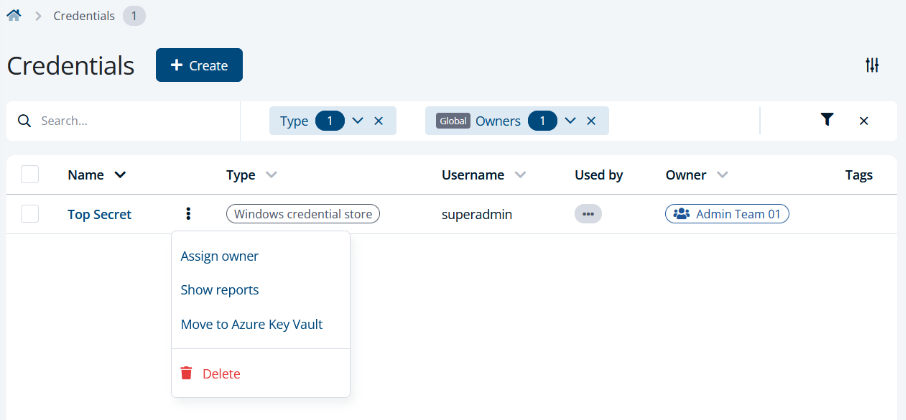
After migration, credentials can be rotated directly in ScriptRunner without touching scripts or configurations.
Key Takeaway
Using Azure Key Vault with ScriptRunner removes one of the last major weak points in enterprise PowerShell automation: credential sprawl. Secrets are no longer locked inside scripts or known only to specific administrators. Governance, auditing, and access control are handled by a service designed specifically for that purpose.
This combination is practical and cost-effective. Azure Key Vault is economical, secure, and compliant by design, while ScriptRunner provides the execution control, delegation, and reporting that operations teams need. Together, they create a clean separation between automation logic and secret management, which is exactly what auditors, security teams, and experienced system administrators want to see in a mature automation environment.
Take credential sprawl out of your automation. Book a meeting with us today.