.svg)


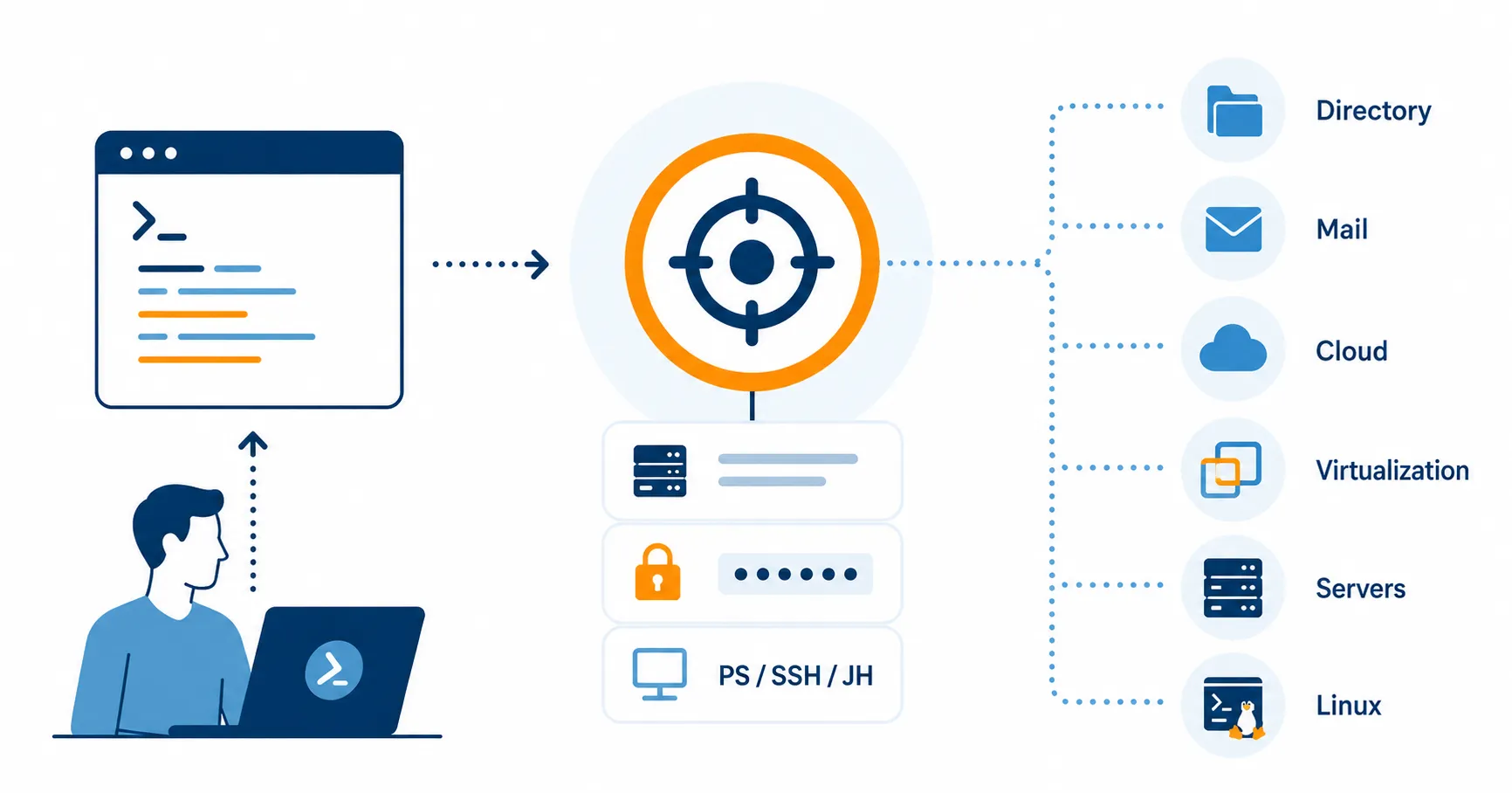

Every PowerShell script eventually needs to talk to a system: Active Directory, Exchange, Microsoft 365, VMware or a database server. In ScriptRunner, that system is called a Target. Targets are one of the core building blocks of the platform, and getting them right is the difference between automation that scales cleanly and automation that turns into a tangle of hardcoded server names, scattered credentials, and scripts that only work on the one machine they were written on.
The Problem: Scripts That Know Too Much About Your Environment
Without a target concept, every PowerShell script has to carry its own environment knowledge. The domain controller name is hardcoded somewhere near the top. The Exchange server FQDN sits in a variable. The M365 tenant ID is pasted in. Credentials are passed as parameters - or worse, embedded as secure strings tied to whatever user happened to encrypt them.
This works for a single script on a single machine. At scale it falls apart. When the Exchange server is replaced, dozens of scripts have to be edited. When a service account password rotates, every script that uses it breaks until someone updates them. When a script needs to run against production instead of test, someone copies the file and changes the connection details by hand. Nobody has a central view of which scripts touch which systems, and a junior admin running a routine task often needs broad administrative permissions on the target system just to make the script work.
The result is automation that is brittle, hard to audit, and hard to delegate safely. The script logic and the environment configuration are tangled together when they should be separate.
What a Target Actually Is
A Target in ScriptRunner is a reusable, named definition of a system that scripts can run against. It bundles three things into one object:
- The connection details - server name, tenant ID, endpoint URL, or whatever identifies the system.
- The credentials - a service account stored in ScriptRunner’s central credential store, pre - assigned to the target.
- The access method - how PowerShell reaches the system: local execution, PowerShell Remoting, SSH, a jump host, a container, or a cloud service connection.
ScriptRunner ships with predefined target types for the systems most IT teams actually manage - Active Directory, Exchange on - premises and Exchange Online, Microsoft 365 and Azure, VMware, Citrix, Windows servers, Linux via SSH, and generic cloud targets - plus a custom option for anything unusual. Once a target is defined, you can test the connection with a single click before any Action ever uses it.
Why This Matters: The Benefits in Practice
Separating the target from the script changes how automation behaves at scale.
Scripts become portable. The same script that creates an AD user can run against your production domain, your test domain, or a customer’s domain just by selecting a different target. No code changes, no copy - paste duplication.
Credentials live in one place. Service account passwords are managed centrally and assigned to targets, not embedded in scripts. When a password rotates, you update the credential once and every Action that uses any target referencing it keeps working. Credentials can also be backed by an external vault such as Azure Key Vault, so the secret itself never lives inside the automation platform (see Using Azure Key Vault with ScriptRunner: Getting Credentials Out of Scripts for Good).
Users do not need permissions on the target systems. This is one of ScriptRunner’s defining ideas: a helpdesk user who triggers a password reset Action does not need Domain Admin rights. The target provides the privileged credential at execution time. The user only needs permission to run the Action. For environments that need to push this further, targets can also be configured to use Just Enough Administration so the privileged identity itself runs only a constrained set of cmdlets (see JEA - Based Remote Execution with ScriptRunner: Enforcing Least Privilege in Enterprise Automation).
Environment changes become trivial. Replace the Exchange server? Update one target. Move to a new M365 tenant? Update one target. None of your scripts need to know.
One Action can run against many targets. Need to apply the same change to fifty Windows servers? Tag the relevant targets and let the Action loop over them. Need to run a health check against every domain in a multi - forest environment? Same pattern.
You get a central inventory. The targets list is, in effect, the catalogue of every system your automation can touch. Security and compliance teams can answer “what does ScriptRunner have access to?” by opening one screen.
Advanced Scenarios
Targets are simple to start with and flexible when you need more. A few capabilities worth knowing about:
- Multi - service targets let you define multiple administrative contexts on the same physical system - for example, separate credentials for the Hyper - V host, the VM, the Windows OS, and the Exchange application running on top, all on what is technically one server.
- Jump hosts and distribution nodes allow ScriptRunner to reach targets indirectly through a management host. Useful for segmented networks where the ScriptRunner server cannot connect to the target directly.
- Tags group targets logically - by site, environment, service tier, or anything else - so Actions and reports can filter on them.
Key Takeaways
- A Target is a reusable connection definition: endpoint, credential, and access method bundled into one object.
- Predefined target types cover AD, Exchange, M365/Azure, VMware, Citrix, Windows, Linux/SSH, and more; custom targets cover the rest.
- Scripts stop carrying environment - specific details, so the same script works across dev, test, and production.
- Credentials are centrally managed and pre - assigned to targets - password rotation updates one place.
- Users running Actions do not need permissions on the target systems; the target provides the privileged identity.
- Multi - service targets, jump hosts, tags, and multi - target execution scale the concept to complex environments.
Bottom Line
Targets are how ScriptRunner separates what a script does from where and as whom it runs. That separation is what makes automation portable, delegable, auditable, and safe to scale. Without it, every script has to be its own little inventory of environment details and credentials. With it, scripts focus on logic and targets handle the connection - which is exactly the boundary you want when ten scripts become a hundred and a hundred become a thousand.
To see how targets work in your environment, book a meeting with us.