



Monitoring tools are very good at telling you that something is wrong. A service stops, a disk fills up, a website returns errors - and within seconds, an alarm goes off. But in most IT teams, that is where the automation ends. Someone still has to get up, log on and apply a fix they have applied a dozen times before. In this article, we take a look at how to build a self-remediation workflow with PRTG and ScriptRunner's Workflow Engine: one that fixes known problems automatically, checks that the fix worked, and only wakes people up when it really needs them.
The 3 a.m. Problem
It is 3 a.m. and PRTG reports that a Windows service on an application server is down. The on-call engineer gets paged, logs on through VPN, restarts the service, checks that it is running again and goes back to bed. Total effort: twenty minutes and a broken night - for a fix that takes one line of PowerShell.
Multiply that by every service, disk and web application your team monitors, and on-call becomes an endless series of the same manual fixes. The knowledge of which fix belongs to which alarm sits in the heads of a few experienced engineers. And when an alarm can't be fixed quickly, the ticket that gets created often contains little more than "sensor down", so the next person starts from zero.
Why Alerts and Runbooks Alone Don't Help
Most teams already have pieces of a solution. The monitoring tool sends alerts, a wiki holds runbooks, and some admins keep a folder of fix-it scripts. But none of these act on their own. Alerts inform, runbooks describe, scripts wait to be run. Teams that do wire scripts directly to alarms often run into the opposite problem: no guardrails. A script fires, but nobody checks whether it actually helped, nobody is told when it didn't, and nobody can see afterwards what was done, when, or why.
Self-Remediation with PRTG and the Workflow Engine
The basic structure of an automated workflow - Trigger, Approve, Execute, Audit - is explained in our article The Anatomy of an Automated IT Workflow. Here, the trigger is a monitoring alarm, and instead of a human approval, the workflow uses clear rules to decide what it is allowed to fix on its own.
Step 1: The Alarm Starts the Workflow
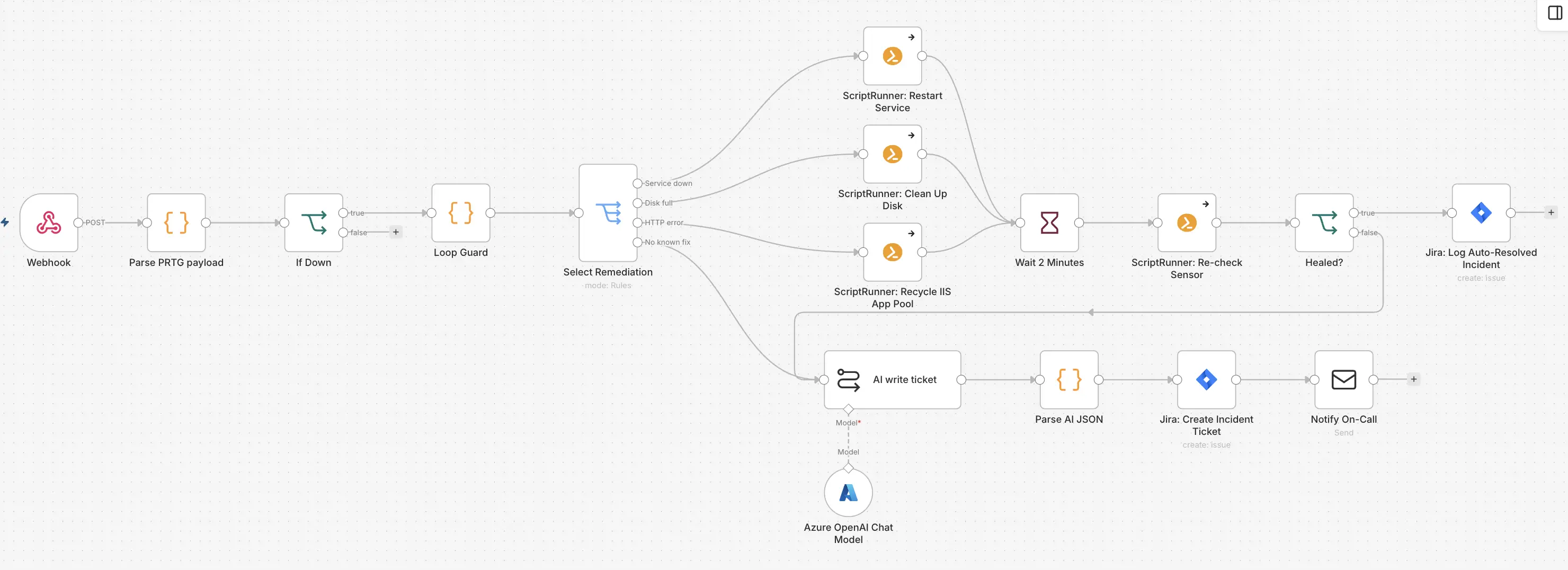
PRTG can call a webhook whenever a sensor changes its state. The workflow receives the alarm with the sensor name, device, status and message, and continues only if the sensor is actually down. Warnings and recoveries are ignored.
Step 2: The Right Fix for the Right Alarm
Next, the workflow picks a fix based on the type of alarm and calls the matching ScriptRunner Action:
- Service down: restart the Windows service
- Disk full: clean up temporary files and old logs
- HTTP error: recycle the IIS application pool
- Anything else: no known fix - escalate to a human
Each fix is a small, reviewed ScriptRunner Action from the central script library, running with managed credentials and logged with every execution. The fix for a stopped service can be as simple as this:
Invoke-Command -ComputerName $ComputerName -ScriptBlock {
	Restart-Service -Name $using:ServiceName -Force
    }
Over time, this becomes a growing library of known fixes - the knowledge of your most experienced engineers, available to everyone at 3 a.m.
In this workflow, you decide which Action responds to which alarm - a simple mapping your team defines and maintains. Soon, the ScriptRunner MCP server will let an AI agent pick the matching Action from your library on its own. We will cover that in an upcoming article.
Step 3: Did It Work?
A fix that hasn't been checked is just a hope. After the fix, the workflow waits two minutes and asks PRTG for the current state of the sensor. If the sensor is up again, the workflow creates a Jira ticket that is already resolved: what went down, what ScriptRunner did, and when the service was back. Nobody was woken up - but there is a record. If the same server needs the same fix every night, problem management can see the pattern and solve the root cause.
Step 4: When Automation Isn't Enough
If the sensor is still down or there is no known fix, the workflow escalates. An AI step writes the incident ticket: what happened, what ScriptRunner already tried, the likely cause and the first things to check. The ticket is created in Jira, and the on-call engineer is notified with the ticket number. Instead of starting from "sensor down", they start with context. The principle is simple: ScriptRunner acts, AI summarizes, humans decide. Every step is logged - see Audit in ScriptRunner: Making Enterprise Automation Traceable and Defensible.
Key Benefits
Fewer nights on call. Known problems are fixed automatically, so engineers are only paged for issues that really need them.
Guardrails built in. Only known, reviewed fixes run automatically, every fix is checked, and anything unexpected goes to a human.
Knowledge that scales. Fixes live as reviewed ScriptRunner Actions in a central library, not in individual heads or wiki pages.
Better tickets, faster resolution. Escalated incidents arrive with context and a record of what was already tried, and every automatic fix is documented for trend analysis.
Key Takeaways
• Monitoring alarms can trigger automated fixes directly through a PRTG webhook
• Each alarm type maps to a specific, reviewed ScriptRunner Action - soon, the ScriptRunner MCP server will let AI choose the right one
• Every fix is verified before the incident is closed
• Auto-resolved incidents are still logged, so recurring problems become visible
• When automation can't help, AI-written tickets give the on-call engineer full context
Bottom Line
A monitoring alarm should not automatically mean a human has to get up. With PRTG and ScriptRunner's Workflow Engine, known problems are fixed, verified and documented automatically - with guardrails that know when to stop and hand over to a person. That is incident response that actually responds.
To see how ScriptRunner can turn your monitoring alarms into automated fixes, book a meeting with us.